Select Games to Compare
Benchmark your exact mobile GPU wattage (TGP), battery throttling drops, and cooling pad requirements for these games.
Professional Ship Simulator vs Masters of Albion
| close | close |
|---|---|
| shopping_cart Where to Buy | |
| info General Information | |
| Release Date | |
| Sep 16, 2026 | Apr 22, 2026 |
| Developer | |
| SWE Systems | 22cans |
| Publisher | |
| Aerosoft | 22cans |
| Genre(s) | |
| Simulation | God Game / Strategy / Simulation |
| Engine | |
| Unreal Engine 5 | Unity Engine (Estimated) |
| stars Ratings & Price | |
| Content Rating | |
| E (Everyone) | T |
| Avg. User Rating | |
| 2.8 / 5.0 | 4.5 / 5.0 |
| Current Price (USD) | |
| $36.99 | $24.99 |
| tune Key Specs | |
| Quick Highlights | |
|
|
| sports_esports Gameplay & Mechanics | |
| Companions/Followers | |
|
|
| Key Collectibles | |
|
|
| Key Themes | |
|
|
| colorize Combat & Gear | |
| Weapons Overview | |
|
|
| Armor / Gear Sets | |
|
|
| Outfits/Customization | |
|
|
| trending_up Progression & Upgrades | |
| Skills & Progression | |
|
Progression in Professional Ship Simulator is deeply rooted in a highly structured, financially driven Career Mode rather than a traditional skill tree. Players must complete rigorous, hands-on tutorials covering ship handling fundamentals and pass strict license check examinations before legally accepting advanced contracts. Upgrades come in the form of purchasing new, specialized vessels from the dry dock, expanding your fleet to handle lucrative, high-risk missions. The game features a punishing circular economy where credits must be meticulously reinvested into mandatory ship repairs, daily operating expenses, and eventually purchasing residential real estate in foreign harbors to unlock permanent fast-travel destinations. |
Progression in Masters of Albion is divided between macro-level divine powers and micro-level settlement upgrades, creating a deeply satisfying dual-layer progression system. As a god, your primary tool is the iconic 'Hand', allowing you to physically pick up objects, villagers, and enemies, cast devastating miracles, and mold the terrain. By gathering Faith from your followers, you unlock an expansive skill tree of divine abilities, ranging from gentle healing rains and crop-boosting sunshine to catastrophic meteor strikes, lightning storms, and plagues. On the settlement level, the game features an incredibly granular crafting and upgrade system. Players must unlock new architectural blueprints, research advanced agriculture, and design custom weaponry piece by piece. You can dictate the specific ingredients in the food your villagers eat to boost their morale and stamina, or custom-forge swords and armor with specific hilts and blades to increase their combat efficacy. Furthermore, the unique Possession skill allows you to directly take control of any villager, hero, or guard, instantly shifting the game into a third-person action RPG. Upgrading the specific combat skills, health pools, and proficiencies of the characters you possess is vital for surviving the increasingly brutal nighttime sieges. |
| public World & Exploration | |
| World & Level Design | |
|
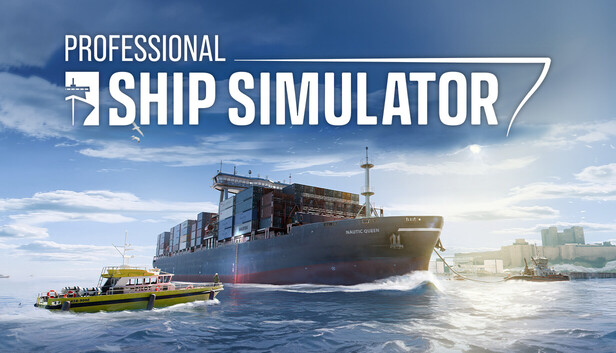
The geographic scope of Professional Ship Simulator is massive, constructed using precise real-world topographical data via a tile-based, moddable map system. At launch, the simulator features two primary theaters: the Island of Rügen (a 60km by 120km recreation of the Baltic Sea) and the Strait of Dover (a colossal 140km by 140km environment). These regions feature over 40 functional commercial harbors and marinas, populated with thousands of authentic seamarks, navigation lights, illuminated buoys, and real-world depth markers. An eight-kilometer AI traffic radius populates these shipping lanes, forcing players to navigate dense, dynamic traffic that strictly adheres to realistic collision avoidance protocols. |
The world map of Masters of Albion offers a vast, interconnected, and highly malleable sandbox environment that players can shape according to their divine will. Starting in the quaint, pastoral town of Oakridge, players will gradually expand their godly influence across a diverse array of biomes, each presenting unique resources, environmental hazards, and strategic challenges. The map is broken down into distinct regions, from lush, rolling green hills and dense, enchanted forests, to treacherous, corrupted marshlands and frozen mountainous peaks. As you progress through the Early Access campaign, the sheer scale of the map reveals itself, allowing for the management of multiple sprawling settlements simultaneously. Each region is dynamically affected by the day-night cycle and the player's moral alignment. A benevolent god will see their regions bloom with vibrant flora, bustling wildlife, and pristine rivers, whereas a malevolent deity will twist the landscape into a desolate, ash-covered wasteland filled with jagged spikes and ominous red skies. The map is not just a static backdrop but a living, breathing canvas that reacts to your every command, ensuring that exploration, expansion, and defense are inextricably linked. |
| Playable Vehicles | |
|
|
| Notable Fauna/Mounts | |
|
|
| book Story & Characters | |
| Main Characters | |
|
|
| Example Missions | |
|
|
| people Multiplayer | |
| Multiplayer Details | |
|
Professional Ship Simulator is designed as a solitary, deeply technical single-player experience focused entirely on the procedural reality of maritime logistics. Unlike its direct competitor, Seafarer: The Ship Sim, which features a slightly more casual 4-player cooperative multiplayer campaign involving narrative mystery and piracy, Professional Ship Simulator focuses entirely on hardcore individual mastery. The environment is populated by a dense, dynamic AI traffic system utilizing realistic shipping lanes and collision avoidance protocols rather than other human players. This solitary design ensures the engine can dedicate maximum computational power to calculating high-fidelity hydrodynamic physics and complex environmental interactions. |
In its initial Early Access iteration, Masters of Albion is being presented as a strictly single-player, narrative-driven simulation experience. The complex mechanics of pausing time, freely manipulating the environment with the God Hand, and taking direct third-person control of villagers are currently balanced exclusively for a solo deity. However, the game's underlying architecture has been built with potential expansion in mind. Peter Molyneux has expressed a strong desire to explore asynchronous multiplayer features, where players could potentially send merchant caravans—or cursed plagues—to the realms of their friends. Furthermore, there are ongoing internal discussions at 22cans regarding a cooperative 'Defend the Realm' mode. If implemented, this mode would allow two players to co-manage a single sprawling city, dividing responsibilities such as one player handling macro-level miracles and building, while the other takes direct, possessed control of the town's heroes to fight on the front lines during the chaotic nighttime sieges. |
| extension Editions & DLC | |
| Available Editions | |
|
Professional Ship Simulator is available primarily in a Standard Edition across PC storefronts, transitioning from its early alpha identity, Nautic XP, into a fully realized hardcore maritime operations platform. It is aggressively priced to capture the simulation market, ranging from approximately $14.99 through third-party key distributors to a standard MSRP of $36.99 (frequently discounted to $29.59) on the Epic Games Store and Steam. The developers, SWE Systems, have eschewed immediate paid DLC expansions in favor of robust community tools. The impending release of the free NXP SDK will provide a Scenario Editor, Bridge Editor, and Ship Editor. |
For its highly anticipated Early Access launch on April 22, 2026, developer 22cans has structured the release into two distinct and highly rewarding editions. The Standard Early Access Edition, priced competitively at $24.99 USD, grants players full access to the base game, including the initial Oakridge region, the complete day-night survival loop, and the foundational god powers. Players who purchase this edition during the first week will also receive a 10% early adopter discount. For die-hard fans of Peter Molyneux's legacy, the 'Founder's Divine Edition' is available for $39.99 USD. This premium tier not only includes the base game but also offers a suite of exclusive digital bonuses designed to enhance the experience. Founders will receive a unique, golden skin for their in-game God Hand, an exclusive loyal pet dog companion that can be assigned to guard any settlement, a digital artbook detailing the conceptualization of the reimagined Albion, and the original orchestral soundtrack composed in the whimsical style of classic British fantasy games. Both editions guarantee access to all future Early Access content updates and the final 1.0 release. |
| Post-Launch Content / DLC | |
|
SWE Systems maintains a tightly controlled development narrative regarding post-launch content, explicitly stating that their primary method for expanding the game will be through official modding support rather than traditional paid DLC. The studio is preparing to release the NXP SDK (Software Development Kit), a powerful suite of Unreal Engine integration tools. This includes a Scenario Editor, Bridge Editor, and Ship Editor, allowing the community to 3D model custom vessels with precise hydrodynamic properties. Modders can alter terrestrial landscapes, create custom harbors, and seamlessly share content via deep Steam Workshop integration, effectively providing endless free, user-generated expansions. |
The launch on April 22, 2026, represents only the beginning of a massive, multi-year journey for Masters of Albion. 22cans has outlined an ambitious Early Access roadmap that promises substantial, free content updates leading up to the 1.0 release. The first major update, titled 'The Rise of the Guilds', will introduce specialized hero classes, merchant caravans, and an expanded economic system. Subsequent updates will roll out entirely new biomes to conquer, deeper morality mechanics that drastically alter village architecture, and a wider variety of horrifying nocturnal enemies. While the team is currently focused on the core single-player experience, they have openly discussed the potential for a premium Expansion Pass post-1.0. This proposed DLC would likely introduce massive new continents, entirely new pantheons of rival gods for players to battle or ally with, and deep-sea naval mechanics. The studio is committed to shaping the post-launch trajectory based directly on community feedback gathered during the Early Access phase. |
| help_outline FAQ | |
| Frequently Asked Questions | |
|
|
| build Technical Details | |
| Graphics & Visual Fidelity | |
|
Constructed upon Unreal Engine 5, Professional Ship Simulator leverages the engine's advanced rendering capabilities to handle massive geographic scales without distracting LOD pop-in. The visual fidelity is staggering, encompassing realistic glass reflections, dynamic smoke emissions tied directly to engine load, and complex weather states ranging from dense volumetric fog to moving storm fronts. The ocean surface is treated as a living entity, with volumetric fluid dynamics simulating every swell, crest, and wave crash. These cutting-edge graphics demand substantial computational resources, with developers targeting a stable 60 FPS while rendering thousands of functional seamarks and long-distance AI traffic. |
Visually, Masters of Albion strikes a brilliant balance between stylized, painterly art direction and modern rendering technologies. The game does not strive for hyper-realism; instead, it embraces a slightly exaggerated, highly expressive aesthetic reminiscent of a dark fairy tale or a classic European folk story. Character models are chunky, colorful, and feature exaggerated animations that clearly convey their emotions and actions from a bird's-eye view. The environments are lush and vibrant, showcasing an impressive level of detail in the swaying foliage, flowing rivers, and intricate architectural designs of the player-built towns. The lighting engine is the true star of the show. The transition from day to night is visually striking, with long, dynamic shadows stretching across the landscape as the sun sets. During the night, the only sources of light are the flickering torches of the town guards, the eerie glow of magical enemies, and the spectacular, particle-heavy explosions of the player's divine miracles, creating a terrifyingly beautiful contrast. |
| Audio & Soundtrack | |
|
The audio soundscape in Professional Ship Simulator underwent significant revisions leading up to the Early Access launch. During the Nautic XP demo phase, community feedback criticized the use of Text-to-Speech (TTS) for in-game voices, which resulted in immersion-breaking mispronunciations of basic nautical terminology. In response, the developers released a major localization and audio pass in Release Candidate 1717. This update replaced several generic sounds with highly discrete, physics-based engine noises, the sound of glass reflections, and dynamic weather acoustics, ensuring that the groans of the hull and the roar of the ocean accurately reflect the vessel's stress levels. |
The audio design and musical score of Masters of Albion are critical components in capturing that distinct, whimsical, and slightly dark atmosphere that fans of Peter Molyneux's previous works adore. The soundtrack features a beautiful, dynamic orchestral score that shifts dramatically based on the time of day and the player's moral alignment. During the day, the music is filled with light, playful woodwinds and sweeping strings that evoke a sense of pastoral peace and bustling medieval industry. As the sun sets and the monstrous hordes approach, the score seamlessly transitions into tense, driving percussion and ominous choral chants that perfectly underscore the desperate fight for survival. The sound design is equally impressive; the God Hand provides immense auditory feedback, from the booming, resonant thud of placing a new building, to the satisfying crackle of a lightning miracle. Villagers react to your presence with a mix of awe, terror, and classic British comedic banter, ensuring the world sounds as alive and reactive as it looks. |
| User Interface (UI/UX) | |
|
The digital interface is dominated by the meticulously recreated Electrical Navigation and Information System (ENIS). This comprehensive avionics suite provides a highly detailed digital nautical chart (ECDIS) populated with real-world seamarks, landmarks, and precise depth soundings. The interface continuously displays critical telemetry like SOG (Speed Over Ground) and heading, allowing players to manipulate complex navigational routes. Furthermore, the UI integrates a fully functional Radar system with AIS and CPA tracking for monitoring AI traffic up to 8 kilometers away. While casual players initially criticized complex keybindings, purists praised the fully clickable, interactive cockpits that minimize UI reliance. |
The user interface in Masters of Albion is a masterclass in diegetic design, heavily inspired by the minimalist, immersive philosophy seen in Black & White. The most prominent UI element is the player's own cursor, visually represented as a giant, expressive, disembodied God Hand that hovers over the world. This hand visually changes based on context and alignment—glowing with angelic light when healing, or turning into a twisted, shadowy claw when casting destructive curses. Traditional menus are kept to an absolute minimum. To craft a weapon, players literally drag and drop physical components onto an anvil in the world. To assign a villager a job, the player picks them up and physically drops them into a field or a guard tower. When accessing necessary menus like the divine skill tree or the macro-economic ledger, the UI unfolds like an ancient, beautifully illustrated parchment scroll, accompanied by satisfying tactile sound effects. This hands-on approach ensures that players feel completely immersed in their role as an omnipotent, world-shaping deity. |
| Accessibility Options | |
|
As a hardcore maritime simulation, accessibility has been a major point of community friction. Casual players reported that the manual start-up procedures and complex keybindings were overwhelmingly difficult, requesting a simplified arcade mode. In response, SWE Systems has prioritized hardware accessibility for simulation enthusiasts. The software boasts out-of-the-box compatibility for over 100 mappable buttons and up to 9 separate analog control axes, supporting complex HOTAS setups and heavy-duty steering wheels. Crucially, the Day 1 update added vital rudder deadzone support and Follow-Up (FU) steering modes, ensuring external hardware communicates flawlessly with the digital vessel without jitter or input lag. |
Understanding the sheer complexity of managing a sprawling simulation while simultaneously engaging in action combat, 22cans has implemented a robust suite of accessibility features. Recognizing that the real-time demands of the nighttime sieges can be overwhelming, the game includes a highly requested 'Tactical Pause' feature, allowing players to freeze the action, issue commands to guards, queue up miracles, and assess the battlefield without pressure. The UI features extensive customization, including scalable text sizes, high-contrast modes for menus, and colorblind filters that adjust the visual indicators for enemy health and area-of-effect spells. Furthermore, players can extensively tune the game's difficulty via granular sliders, adjusting parameters such as villager hunger rates, resource gathering speeds, and enemy damage output independently. This ensures that players who simply want to enjoy a relaxing, creative city-building experience can tone down the survival horror elements, while hardcore strategists can dial up the nocturnal threat to truly test their divine mettle. |
| video_library Media Links | |
| Gameplay Video | |
| launchWatch | launchWatch |
| Walkthrough/Guide | |
| launchView | launchView |
| settings_applications System Requirements | |
| 1080p (Full HD) - Recommended (High Preset) CPU: Provides the overhead needed for the massive 8km AI traffic radius. CPU (Laptop): High core count prevents physics calculation bottlenecks. GPU: Allows stable 60 FPS while rendering complex weather states and glass reflections. GPU (Laptop): Accounts for laptop thermal limits to match desktop 4070 performance. RAM: Ensures completely seamless long-distance map traversal. Storage: NVMe SSD required for maximum asset streaming efficiency. | |
memoryCPU: Intel Core i7-13700HX (or similar) developer_boardGPU: NVIDIA RTX 4070 (12GB VRAM) or AMD RX 7800 XT laptop_macCPU (L): Intel Core i7-13700HX laptop_windowsGPU (L): NVIDIA RTX 4080 Mobile layersRAM: 32 GB saveStorage (Tier): 16 GB available space | memoryCPU: Intel Core i7-10700K or AMD Ryzen 7 5800X developer_boardGPU: NVIDIA GeForce RTX 3060 Ti or AMD Radeon RX 6700 XT laptop_macCPU (L): Intel Core i7-11800H or AMD Ryzen 7 5800H laptop_windowsGPU (L): NVIDIA RTX 3070 Mobile (130W) layersRAM: 16 GB saveStorage (Tier): 40GB NVMe SSD |
| 1080p (Full HD) - Minimum (Low/Medium Preset) CPU: Minimum required to calculate complex ship physics and AI traffic patterns. CPU (Laptop): Matches the desktop minimum baseline for physics processing. GPU: Base requirement for rendering Unreal Engine 5 environments. GPU (Laptop): Equivalent raw performance necessary for 1080p fluid dynamics. RAM: Essential for holding dense coastal infrastructure and tile-based maps in memory. Storage: SSD highly recommended for smooth tile loading without stuttering. | |
memoryCPU: Intel Core i5-12500H (or similar) developer_boardGPU: NVIDIA GTX 1080 TI (or similar) laptop_macCPU (L): Intel Core i5-12500H laptop_windowsGPU (L): NVIDIA RTX 3060 Mobile (High TGP) layersRAM: 16 GB saveStorage (Tier): 16 GB available space | memoryCPU: Intel Core i5-8400 or AMD Ryzen 5 2600 developer_boardGPU: NVIDIA GeForce GTX 1060 6GB or AMD Radeon RX 580 laptop_macCPU (L): Intel Core i7-9750H or AMD Ryzen 7 3750H laptop_windowsGPU (L): NVIDIA GTX 1660 Ti Mobile layersRAM: 16 GB saveStorage (Tier): 40GB SATA SSD |
| 1440p (QHD/2K) - Recommended (High/Ultra Preset) CPU: Required to maintain high framerates alongside dense simulation tasks. CPU (Laptop): Maximum mobile processing power to handle UI telemetry and UE5 physics. GPU: Ensures no frame drops during heavy volumetric storms. GPU (Laptop): High TGP required for 1440p rendering at target 60 FPS. RAM: Maintains stability across extended maritime voyages. Storage: Fast NVMe SSD prevents hitches during rapid vessel turning. | |
memoryCPU: Intel Core i7-13700K or AMD Ryzen 7 7800X3D developer_boardGPU: NVIDIA RTX 4080 or AMD RX 7900 XT laptop_macCPU (L): Intel Core i9-13900HX laptop_windowsGPU (L): NVIDIA RTX 4090 Mobile layersRAM: 32 GB saveStorage (Tier): 16 GB available space | memoryCPU: Intel Core i5-13600K or AMD Ryzen 7 7700X developer_boardGPU: NVIDIA GeForce RTX 4070 or AMD Radeon RX 7800 XT laptop_macCPU (L): Intel Core i9-12900HX or AMD Ryzen 9 6900HX laptop_windowsGPU (L): NVIDIA RTX 4080 Mobile layersRAM: 32 GB saveStorage (Tier): 40GB NVMe Gen 4 SSD |
| 2160p (UHD/4K) - Recommended (Ultra Preset) CPU: Ultimate performance for zero-compromise simulation processing. CPU (Laptop): The absolute peak mobile CPU for handling professional training metrics. GPU: The only reliable GPU for rendering UE5 fluid dynamics smoothly at 4K. GPU (Laptop): Requires maximum TGP to handle 4K resolution rendering overhead. RAM: Future-proofs the system for highly complex, unoptimized community SDK mods. Storage: PCIe Gen 4.0 NVMe SSD strictly required. | |
memoryCPU: Intel Core i9-14900K or AMD Ryzen 9 7950X3D developer_boardGPU: NVIDIA RTX 4090 laptop_macCPU (L): Intel Core i9-14900HX laptop_windowsGPU (L): NVIDIA RTX 4090 Mobile (175W) layersRAM: 64 GB saveStorage (Tier): 16 GB available space | — |
| 2160p (UHD/4K) - Ultra (Max Settings, 60 FPS) CPU: The ultimate setup for maintaining perfect simulation ticks with zero bottlenecking at the highest visual fidelity. CPU (Laptop): Necessary to keep up with the extreme demands of 4K rendering and massive AI pathing. GPU: Crushes 4K resolution, keeping the framerate silky smooth even when the screen is filled with particle effects and hundreds of units. GPU (Laptop): The only mobile GPU truly capable of driving this simulation at 4K without relying entirely on upscaling. RAM: Ensures no memory bottlenecks occur during extended, hours-long play sessions. Storage: Required for optimal performance and near-zero loading screens. | |
| — | memoryCPU: Intel Core i9-14900K or AMD Ryzen 9 7950X3D developer_boardGPU: NVIDIA GeForce RTX 4080 Super or AMD Radeon RX 7900 XTX laptop_macCPU (L): Intel Core i9-14900HX laptop_windowsGPU (L): NVIDIA RTX 4090 Mobile (175W) layersRAM: 32 GB saveStorage (Tier): 40GB NVMe Gen 4 SSD |
| save Overall Storage | |
| Spec: 16 GB available space Note: Relatively small footprint achieved through procedural map tile loading, SSD strongly recommended. Type: Unknown | Spec: 40GB Solid State Drive (SSD) Note: An SSD is strictly required to stream high-resolution textures and seamlessly load massive world chunks as your divine view zooms in and out. Type: SSD |
| desktop_windows Operating System | |
| Spec: Windows 11 Home Explanation: Required for optimal DirectX 12 integration and modern hardware scheduling. | Spec: Windows 10 / 11 64-bit Explanation: Required to run the underlying engine's advanced memory management systems for large-scale town simulations. |
| gamepad DirectX Version | |
| Spec: Version 12 Explanation: Mandatory for Unreal Engine 5 advanced rendering features and hardware-accelerated fluid dynamics. | Spec: DirectX 12 Explanation: Ensures optimal API overhead reduction, allowing the GPU and CPU to efficiently render thousands of dynamic entities. |
| info_outline Other Game Notes | |
|
|
| build Optimization Details | |
|
|
| laptop Laptop Considerations | |
|
|

info_outline Feature details based on available data. System requirements and performance estimates may vary.
laptop_chromebook Laptop Recommendations
Common Recommendations (Handles All Compared Games)

- memory Intel Core i7-12700H
- developer_board NVIDIA GeForce RTX 3070
- layers 32GB DDR4-3200MHz
- track_changes Target GPU: NVIDIA RTX 3060 Mobile (High TGP) / NVIDIA GTX 1660 Ti Mobile

- memory Intel Core i9-13900H
- developer_board NVIDIA GeForce RTX 4060
- layers 16GB DDR5-5200MHz
- track_changes Target GPU: NVIDIA RTX 3060 Mobile (High TGP) / NVIDIA GTX 1660 Ti Mobile

- memory Intel Core i9-14900HX
- developer_board NVIDIA GeForce RTX 4060
- layers 32GB DDR5-5600MHz
- track_changes Target GPU: NVIDIA RTX 3060 Mobile (High TGP) / NVIDIA GTX 1660 Ti Mobile

- memory Intel Core i9-14900HX
- developer_board NVIDIA GeForce RTX 4080 Laptop GPU
- layers 64 GB DDR5-5600MHz
- track_changes Target GPU: NVIDIA RTX 4080 Mobile / NVIDIA RTX 3070 Mobile (130W)

- memory Intel Core Ultra 9 Processor 275HX (Series 2)
- developer_board NVIDIA GeForce RTX 5070 Laptop GPU
- layers 32GB DDR5-5600MHz
- track_changes Target GPU: NVIDIA RTX 4080 Mobile / NVIDIA RTX 3070 Mobile (130W)

- memory Intel Core i9-14900HX Processor
- developer_board NVIDIA GeForce RTX 5070 Laptop GPU
- layers 32GB DDR5-5600MHz
- track_changes Target GPU: NVIDIA RTX 4080 Mobile / NVIDIA RTX 3070 Mobile (130W)

- memory Intel Core i9-14900HX
- developer_board NVIDIA GeForce RTX 4090
- layers 32GB DDR5-5600MHz
- track_changes Target GPU: NVIDIA RTX 4090 Mobile / NVIDIA RTX 4080 Mobile

- memory Intel Core Ultra 9 285H (Series 2) , 14 cores (6 Performance cores + 8 Efficient cores), 20 threads
- developer_board NVIDIA GeForce RTX 5050 Laptop GPU
- layers 32GB (2x16GB) DDR5 8400MHz SO-DIMM
- track_changes Target GPU: NVIDIA RTX 4090 Mobile / NVIDIA RTX 4080 Mobile

- memory Intel Core Ultra 9 285H
- developer_board NVIDIA GeForce RTX 5070
- layers 32GB (2x16GB) DDR5 4800MHz SO-DIMM
- track_changes Target GPU: NVIDIA RTX 4090 Mobile / NVIDIA RTX 4080 Mobile

- memory Intel Core i9-14900HX Processor
- developer_board NVIDIA GeForce RTX 5070 Ti Laptop GPU
- layers 64GB DDR5-5600MHz (commonly listed as 4800MHz by some retailers, but 5600MHz is common for 14th Gen HX with DDR5)
- track_changes Target GPU: NVIDIA RTX 4090 Mobile (175W)

- memory Intel Core Ultra 9 Processor 275HX
- developer_board NVIDIA GeForce RTX 5070 Ti Laptop GPU
- layers 64GB DDR5-6400MHz
- track_changes Target GPU: NVIDIA RTX 4090 Mobile (175W)

- memory Intel Core Ultra 9 275HX
- developer_board GeForce RTX 5070 Laptop Laptop GPU
- layers 64GB DDR5-6400MHz (Single-Channel)
- track_changes Target GPU: NVIDIA RTX 4090 Mobile (175W)
- memory Intel Core i9-14900HX
- developer_board NVIDIA GeForce RTX 4090
- layers 32GB DDR5-5600MHz
- track_changes Target GPU: NVIDIA RTX 4090 Mobile (175W)
- memory Intel Core Ultra 9 285H (Series 2) , 14 cores (6 Performance cores + 8 Efficient cores), 20 threads
- developer_board NVIDIA GeForce RTX 5050 Laptop GPU
- layers 32GB (2x16GB) DDR5 8400MHz SO-DIMM
- track_changes Target GPU: NVIDIA RTX 4090 Mobile (175W)
- memory Intel Core Ultra 9 285H
- developer_board NVIDIA GeForce RTX 5070
- layers 32GB (2x16GB) DDR5 4800MHz SO-DIMM
- track_changes Target GPU: NVIDIA RTX 4090 Mobile (175W)
For Professional Ship Simulator Specifically
- memory Intel Core i7-12700H
- developer_board NVIDIA GeForce RTX 3070
- layers 32GB DDR4-3200MHz
- track_changes Target GPU: NVIDIA GTX 1080 TI (or similar)
- memory Intel Core i9-13900H
- developer_board NVIDIA GeForce RTX 4060
- layers 16GB DDR5-5200MHz
- track_changes Target GPU: NVIDIA GTX 1080 TI (or similar)
- memory Intel Core i9-14900HX
- developer_board NVIDIA GeForce RTX 4060
- layers 32GB DDR5-5600MHz
- track_changes Target GPU: NVIDIA GTX 1080 TI (or similar)

- memory Intel Core i9-12900H
- developer_board NVIDIA GeForce RTX 3070 Ti
- layers 16GB DDR5-4800MHz
- track_changes Target GPU: NVIDIA GTX 1080 TI (or similar)

- memory Intel Core i5-12500H
- developer_board NVIDIA GeForce RTX 3050 Ti
- layers 16GB DDR4-3200MHz
- track_changes Target GPU: NVIDIA GTX 1080 TI (or similar)

- memory AMD Ryzen 7 7435HS
- developer_board NVIDIA GeForce RTX 3050
- layers 32GB DDR5-4800MHz
- track_changes Target GPU: NVIDIA GTX 1080 TI (or similar)

- memory AMD Ryzen 7 6800H
- developer_board NVIDIA GeForce RTX 3060
- layers 16GB DDR5-4800MHz
- track_changes Target GPU: NVIDIA GTX 1080 TI (or similar)

- memory AMD Ryzen 9 5900HS
- developer_board NVIDIA GeForce RTX 3080
- layers 16GB DDR4-3200MHz
- track_changes Target GPU: NVIDIA GTX 1080 TI (or similar)

- memory Intel Core i7-13620H
- developer_board NVIDIA GeForce RTX 4070
- layers 16GB DDR5-4800MHz
- track_changes Target GPU: NVIDIA GTX 1080 TI (or similar)

- memory Intel Core i7-14700HX
- developer_board NVIDIA GeForce RTX 4070
- layers 16GB DDR5-5600MHz
- track_changes Target GPU: NVIDIA GTX 1080 TI (or similar)
- memory Intel Core i9-14900HX
- developer_board NVIDIA GeForce RTX 4080 Laptop GPU
- layers 64 GB DDR5-5600MHz
- track_changes Target GPU: NVIDIA RTX 4070 (12GB VRAM) or AMD RX 7800 XT
- memory Intel Core Ultra 9 Processor 275HX (Series 2)
- developer_board NVIDIA GeForce RTX 5070 Laptop GPU
- layers 32GB DDR5-5600MHz
- track_changes Target GPU: NVIDIA RTX 4070 (12GB VRAM) or AMD RX 7800 XT
- memory Intel Core i9-14900HX Processor
- developer_board NVIDIA GeForce RTX 5070 Laptop GPU
- layers 32GB DDR5-5600MHz
- track_changes Target GPU: NVIDIA RTX 4070 (12GB VRAM) or AMD RX 7800 XT

- memory Intel Core i9-14900HX Processor
- developer_board NVIDIA GeForce RTX 5070 Laptop GPU
- layers 32GB DDR5-5600MHz
- track_changes Target GPU: NVIDIA RTX 4070 (12GB VRAM) or AMD RX 7800 XT

- memory Intel Core Ultra 9 285H (Arrow Lake-H)
- developer_board NVIDIA GeForce RTX 5070 Laptop GPU
- layers 64GB LPDDR5x-8533MT/s (LPCAMM2)
- track_changes Target GPU: NVIDIA RTX 4070 (12GB VRAM) or AMD RX 7800 XT

- memory AMD Ryzen 9 7945HX
- developer_board NVIDIA GeForce RTX 4080
- layers 32GB DDR5
- track_changes Target GPU: NVIDIA RTX 4070 (12GB VRAM) or AMD RX 7800 XT

- memory Intel Core i9-14900HX
- developer_board NVIDIA GeForce RTX 4080
- layers 64GB DDR5-5600MHz
- track_changes Target GPU: NVIDIA RTX 4070 (12GB VRAM) or AMD RX 7800 XT

- memory Intel Core i9-14900HX
- developer_board NVIDIA GeForce RTX 4080
- layers 32GB DDR5-5600MHz
- track_changes Target GPU: NVIDIA RTX 4070 (12GB VRAM) or AMD RX 7800 XT

- memory Intel Core i9-14900HX
- developer_board NVIDIA GeForce RTX 4080
- layers 32GB DDR5-5600MHz
- track_changes Target GPU: NVIDIA RTX 4070 (12GB VRAM) or AMD RX 7800 XT

- memory Intel Core i9-14900HX
- developer_board NVIDIA GeForce RTX 4080
- layers 32GB DDR5-5600MHz
- track_changes Target GPU: NVIDIA RTX 4070 (12GB VRAM) or AMD RX 7800 XT
- memory Intel Core i9-14900HX
- developer_board NVIDIA GeForce RTX 4090
- layers 32GB DDR5-5600MHz
- track_changes Target GPU: NVIDIA RTX 4080 or AMD RX 7900 XT
- memory Intel Core Ultra 9 285H (Series 2) , 14 cores (6 Performance cores + 8 Efficient cores), 20 threads
- developer_board NVIDIA GeForce RTX 5050 Laptop GPU
- layers 32GB (2x16GB) DDR5 8400MHz SO-DIMM
- track_changes Target GPU: NVIDIA RTX 4080 or AMD RX 7900 XT
- memory Intel Core Ultra 9 285H
- developer_board NVIDIA GeForce RTX 5070
- layers 32GB (2x16GB) DDR5 4800MHz SO-DIMM
- track_changes Target GPU: NVIDIA RTX 4080 or AMD RX 7900 XT
- memory Intel Core i9-14900HX Processor
- developer_board NVIDIA GeForce RTX 5070 Ti Laptop GPU
- layers 64GB DDR5-5600MHz (commonly listed as 4800MHz by some retailers, but 5600MHz is common for 14th Gen HX with DDR5)
- track_changes Target GPU: NVIDIA RTX 4080 or AMD RX 7900 XT
- memory Intel Core Ultra 9 Processor 275HX
- developer_board NVIDIA GeForce RTX 5070 Ti Laptop GPU
- layers 64GB DDR5-6400MHz
- track_changes Target GPU: NVIDIA RTX 4080 or AMD RX 7900 XT

- memory Intel Core Ultra 9 Processor 275HX (Series 2)
- developer_board NVIDIA GeForce RTX 5070 Ti Laptop GPU
- layers 32GB DDR5-5600MHz
- track_changes Target GPU: NVIDIA RTX 4080 or AMD RX 7900 XT

- memory Intel Ultra 7 255HX
- developer_board NVIDIA GeForce RTX 5070 Ti
- layers 32GB DDR5 5600MHz
- track_changes Target GPU: NVIDIA RTX 4080 or AMD RX 7900 XT

- memory Intel Core Ultra 7 240H
- developer_board NVIDIA GeForce RTX 5070 Ti Laptop GPU
- layers 32GB LPDDR5X 5600MHz
- track_changes Target GPU: NVIDIA RTX 4080 or AMD RX 7900 XT
- memory Intel Core Ultra 9 275HX
- developer_board GeForce RTX 5070 Laptop Laptop GPU
- layers 64GB DDR5-6400MHz (Single-Channel)
- track_changes Target GPU: NVIDIA RTX 4080 or AMD RX 7900 XT

- memory Intel Core Ultra 9 275HX
- developer_board NVIDIA GeForce RTX 5070 Ti
- layers 32GB
- track_changes Target GPU: NVIDIA RTX 4080 or AMD RX 7900 XT
- memory Intel Core i9-14900HX Processor
- developer_board NVIDIA GeForce RTX 5070 Ti Laptop GPU
- layers 64GB DDR5-5600MHz (commonly listed as 4800MHz by some retailers, but 5600MHz is common for 14th Gen HX with DDR5)
- track_changes Target GPU: NVIDIA RTX 4090
- memory Intel Core Ultra 9 Processor 275HX
- developer_board NVIDIA GeForce RTX 5070 Ti Laptop GPU
- layers 64GB DDR5-6400MHz
- track_changes Target GPU: NVIDIA RTX 4090
- memory Intel Core Ultra 9 275HX
- developer_board GeForce RTX 5070 Laptop Laptop GPU
- layers 64GB DDR5-6400MHz (Single-Channel)
- track_changes Target GPU: NVIDIA RTX 4090
- memory AMD Ryzen 9 9955HX
- developer_board NVIDIA GeForce RTX 5070 Ti Laptop GPU
- layers 64GB DDR5-5600MHz (Dual-Channel)
- track_changes Target GPU: NVIDIA RTX 4090

- memory Intel Core Ultra 9 285HX
- developer_board NVIDIA GeForce RTX 5080
- layers 64GB DDR5-5600MHz
- track_changes Target GPU: NVIDIA RTX 4090

- memory Intel Core Ultra 9 275HX
- developer_board NVIDIA GeForce RTX 5090
- layers 64GB DDR5
- track_changes Target GPU: NVIDIA RTX 4090

- memory Intel Core Ultra 9 285HX
- developer_board NVIDIA GeForce RTX 5090
- layers 64GB DDR5-6400MHz
- track_changes Target GPU: NVIDIA RTX 4090
- memory Intel Core i9-14900HX
- developer_board NVIDIA GeForce RTX 4080
- layers 64GB DDR5-5600MHz
- track_changes Target GPU: NVIDIA RTX 4090

- memory AMD Ryzen 9 7845HX
- developer_board NVIDIA GeForce RTX 4080
- layers Up to 64GB DDR5
- track_changes Target GPU: NVIDIA RTX 4090
For Masters of Albion Specifically
- memory Intel Core i7-12700H
- developer_board NVIDIA GeForce RTX 3070
- layers 32GB DDR4-3200MHz
- track_changes Target GPU: NVIDIA GeForce GTX 1060 6GB or AMD Radeon RX 580
- memory Intel Core i9-13900H
- developer_board NVIDIA GeForce RTX 4060
- layers 16GB DDR5-5200MHz
- track_changes Target GPU: NVIDIA GeForce GTX 1060 6GB or AMD Radeon RX 580
- memory Intel Core i9-14900HX
- developer_board NVIDIA GeForce RTX 4060
- layers 32GB DDR5-5600MHz
- track_changes Target GPU: NVIDIA GeForce GTX 1060 6GB or AMD Radeon RX 580
- memory Intel Core i9-12900H
- developer_board NVIDIA GeForce RTX 3070 Ti
- layers 16GB DDR5-4800MHz
- track_changes Target GPU: NVIDIA GeForce GTX 1060 6GB or AMD Radeon RX 580

- memory Intel Core i5-12450H
- developer_board NVIDIA GeForce RTX 3050
- layers 16GB DDR4-3200MHz
- track_changes Target GPU: NVIDIA GeForce GTX 1060 6GB or AMD Radeon RX 580
- memory Intel Core i5-12500H
- developer_board NVIDIA GeForce RTX 3050 Ti
- layers 16GB DDR4-3200MHz
- track_changes Target GPU: NVIDIA GeForce GTX 1060 6GB or AMD Radeon RX 580
- memory AMD Ryzen 7 7435HS
- developer_board NVIDIA GeForce RTX 3050
- layers 32GB DDR5-4800MHz
- track_changes Target GPU: NVIDIA GeForce GTX 1060 6GB or AMD Radeon RX 580
- memory AMD Ryzen 7 6800H
- developer_board NVIDIA GeForce RTX 3060
- layers 16GB DDR5-4800MHz
- track_changes Target GPU: NVIDIA GeForce GTX 1060 6GB or AMD Radeon RX 580
- memory AMD Ryzen 9 5900HS
- developer_board NVIDIA GeForce RTX 3080
- layers 16GB DDR4-3200MHz
- track_changes Target GPU: NVIDIA GeForce GTX 1060 6GB or AMD Radeon RX 580
- memory Intel Core i7-13620H
- developer_board NVIDIA GeForce RTX 4070
- layers 16GB DDR5-4800MHz
- track_changes Target GPU: NVIDIA GeForce GTX 1060 6GB or AMD Radeon RX 580
- memory Intel Core i7-14700HX
- developer_board NVIDIA GeForce RTX 4070
- layers 16GB DDR5-5600MHz
- track_changes Target GPU: NVIDIA GeForce RTX 3060 Ti or AMD Radeon RX 6700 XT

- memory Intel Core i9-14900HX
- developer_board NVIDIA GeForce RTX 4070
- layers 32GB DDR5-5600MHz
- track_changes Target GPU: NVIDIA GeForce RTX 3060 Ti or AMD Radeon RX 6700 XT
- memory Intel Core i9-14900HX
- developer_board NVIDIA GeForce RTX 4080 Laptop GPU
- layers 64 GB DDR5-5600MHz
- track_changes Target GPU: NVIDIA GeForce RTX 4070 or AMD Radeon RX 7800 XT
- memory Intel Core Ultra 9 Processor 275HX (Series 2)
- developer_board NVIDIA GeForce RTX 5070 Laptop GPU
- layers 32GB DDR5-5600MHz
- track_changes Target GPU: NVIDIA GeForce RTX 4070 or AMD Radeon RX 7800 XT
- memory Intel Core i9-14900HX Processor
- developer_board NVIDIA GeForce RTX 5070 Laptop GPU
- layers 32GB DDR5-5600MHz
- track_changes Target GPU: NVIDIA GeForce RTX 4070 or AMD Radeon RX 7800 XT
- memory Intel Core i9-14900HX Processor
- developer_board NVIDIA GeForce RTX 5070 Laptop GPU
- layers 32GB DDR5-5600MHz
- track_changes Target GPU: NVIDIA GeForce RTX 4070 or AMD Radeon RX 7800 XT
- memory Intel Core Ultra 9 285H (Arrow Lake-H)
- developer_board NVIDIA GeForce RTX 5070 Laptop GPU
- layers 64GB LPDDR5x-8533MT/s (LPCAMM2)
- track_changes Target GPU: NVIDIA GeForce RTX 4070 or AMD Radeon RX 7800 XT
- memory Intel Core i9-14900HX
- developer_board NVIDIA GeForce RTX 4080
- layers 64GB DDR5-5600MHz
- track_changes Target GPU: NVIDIA GeForce RTX 4070 or AMD Radeon RX 7800 XT
- memory Intel Core i9-14900HX
- developer_board NVIDIA GeForce RTX 4080
- layers 32GB DDR5-5600MHz
- track_changes Target GPU: NVIDIA GeForce RTX 4070 or AMD Radeon RX 7800 XT
- memory Intel Core i9-14900HX
- developer_board NVIDIA GeForce RTX 4080
- layers 32GB DDR5-5600MHz
- track_changes Target GPU: NVIDIA GeForce RTX 4070 or AMD Radeon RX 7800 XT
- memory Intel Core i9-14900HX
- developer_board NVIDIA GeForce RTX 4080
- layers 32GB DDR5-5600MHz
- track_changes Target GPU: NVIDIA GeForce RTX 4070 or AMD Radeon RX 7800 XT
- memory AMD Ryzen 9 7845HX
- developer_board NVIDIA GeForce RTX 4080
- layers Up to 64GB DDR5
- track_changes Target GPU: NVIDIA GeForce RTX 4070 or AMD Radeon RX 7800 XT
- memory Intel Core Ultra 9 285H (Series 2) , 14 cores (6 Performance cores + 8 Efficient cores), 20 threads
- developer_board NVIDIA GeForce RTX 5050 Laptop GPU
- layers 32GB (2x16GB) DDR5 8400MHz SO-DIMM
- track_changes Target GPU: NVIDIA GeForce RTX 4080 Super or AMD Radeon RX 7900 XTX
- memory Intel Core Ultra 9 285H
- developer_board NVIDIA GeForce RTX 5070
- layers 32GB (2x16GB) DDR5 4800MHz SO-DIMM
- track_changes Target GPU: NVIDIA GeForce RTX 4080 Super or AMD Radeon RX 7900 XTX
- memory Intel Core i9-14900HX Processor
- developer_board NVIDIA GeForce RTX 5070 Ti Laptop GPU
- layers 64GB DDR5-5600MHz (commonly listed as 4800MHz by some retailers, but 5600MHz is common for 14th Gen HX with DDR5)
- track_changes Target GPU: NVIDIA GeForce RTX 4080 Super or AMD Radeon RX 7900 XTX
- memory Intel Core Ultra 9 Processor 275HX
- developer_board NVIDIA GeForce RTX 5070 Ti Laptop GPU
- layers 64GB DDR5-6400MHz
- track_changes Target GPU: NVIDIA GeForce RTX 4080 Super or AMD Radeon RX 7900 XTX
- memory Intel Core Ultra 9 Processor 275HX (Series 2)
- developer_board NVIDIA GeForce RTX 5070 Ti Laptop GPU
- layers 32GB DDR5-5600MHz
- track_changes Target GPU: NVIDIA GeForce RTX 4080 Super or AMD Radeon RX 7900 XTX
- memory Intel Ultra 7 255HX
- developer_board NVIDIA GeForce RTX 5070 Ti
- layers 32GB DDR5 5600MHz
- track_changes Target GPU: NVIDIA GeForce RTX 4080 Super or AMD Radeon RX 7900 XTX
- memory Intel Core Ultra 7 240H
- developer_board NVIDIA GeForce RTX 5070 Ti Laptop GPU
- layers 32GB LPDDR5X 5600MHz
- track_changes Target GPU: NVIDIA GeForce RTX 4080 Super or AMD Radeon RX 7900 XTX
- memory Intel Core Ultra 9 275HX
- developer_board GeForce RTX 5070 Laptop Laptop GPU
- layers 64GB DDR5-6400MHz (Single-Channel)
- track_changes Target GPU: NVIDIA GeForce RTX 4080 Super or AMD Radeon RX 7900 XTX
- memory Intel Core Ultra 9 275HX
- developer_board NVIDIA GeForce RTX 5070 Ti
- layers 32GB
- track_changes Target GPU: NVIDIA GeForce RTX 4080 Super or AMD Radeon RX 7900 XTX

- memory Intel Core Ultra 9 275HX
- developer_board NVIDIA GeForce RTX 5070 Ti Laptop GPU
- layers 32 GB DDR5 6400MHz (2x16GB)
- track_changes Target GPU: NVIDIA GeForce RTX 4080 Super or AMD Radeon RX 7900 XTX
info_outline Laptop recommendations are estimates based on available component benchmarks and game requirements. Actual performance may vary depending on settings, drivers, cooling, power limits, etc. Prices and availability subject to change. As an Amazon Associate, we earn from qualifying purchases.