Select Games to Compare
Benchmark your exact mobile GPU wattage (TGP), battery throttling drops, and cooling pad requirements for these games.
Professional Ship Simulator vs Jurassic World Evolution 3
| close | close |
|---|---|
| shopping_cart Where to Buy | |
| info General Information | |
| Release Date | |
| Sep 16, 2026 | Oct 21, 2025 |
| Developer | |
| SWE Systems | Frontier Developments |
| Publisher | |
| Aerosoft | Frontier Developments |
| Genre(s) | |
| Simulation | Construction and Management Simulation, Park Builder, Strategy |
| Engine | |
| Unreal Engine 5 | Cobra Engine |
| stars Ratings & Price | |
| Content Rating | |
| E (Everyone) | T (Teen) |
| Avg. User Rating | |
| 2.8 / 5.0 | 4.8 / 5.0 |
| Current Price (USD) | |
| $36.99 | $59.99 |
| tune Key Specs | |
| Quick Highlights | |
|
|
| sports_esports Gameplay & Mechanics | |
| Companions/Followers | |
|
|
| Key Collectibles | |
|
|
| Key Themes | |
|
|
| colorize Combat & Gear | |
| Weapons Overview | |
|
|
| Armor / Gear Sets | |
|
|
| Outfits/Customization | |
|
|
| trending_up Progression & Upgrades | |
| Skills & Progression | |
|
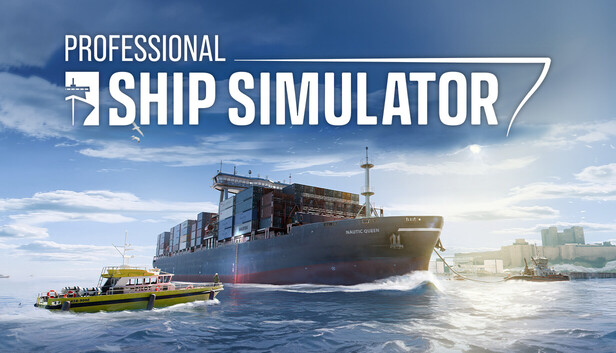
Progression in Professional Ship Simulator is deeply rooted in a highly structured, financially driven Career Mode rather than a traditional skill tree. Players must complete rigorous, hands-on tutorials covering ship handling fundamentals and pass strict license check examinations before legally accepting advanced contracts. Upgrades come in the form of purchasing new, specialized vessels from the dry dock, expanding your fleet to handle lucrative, high-risk missions. The game features a punishing circular economy where credits must be meticulously reinvested into mandatory ship repairs, daily operating expenses, and eventually purchasing residential real estate in foreign harbors to unlock permanent fast-travel destinations. |
Progression is centered on park management and genetic engineering. The new breeding system allows players to guide the genetic inheritance of traits over generations. Players unlock new buildings, attractions, and species by achieving goals. New automation systems, like the ATV Maintenance Team and security cameras, allow for more streamlined park management. |
| public World & Exploration | |
| World & Level Design | |
|
The geographic scope of Professional Ship Simulator is massive, constructed using precise real-world topographical data via a tile-based, moddable map system. At launch, the simulator features two primary theaters: the Island of Rügen (a 60km by 120km recreation of the Baltic Sea) and the Strait of Dover (a colossal 140km by 140km environment). These regions feature over 40 functional commercial harbors and marinas, populated with thousands of authentic seamarks, navigation lights, illuminated buoys, and real-world depth markers. An eight-kilometer AI traffic radius populates these shipping lanes, forcing players to navigate dense, dynamic traffic that strictly adheres to realistic collision avoidance protocols. |
The campaign is non-linear, allowing players to travel freely between unlocked park locations across the globe. Confirmed settings include never-before-seen islands inspired by Japan and Hawaii, as well as the Montana Badlands. The game features powerful new 'Tectonic Terraforming' tools for creating extreme verticality, valleys, and waterfalls. |
| Playable Vehicles | |
|
|
| Notable Fauna/Mounts | |
|
N/A |
| book Story & Characters | |
| Main Characters | |
|
|
| Example Missions | |
|
N/A |
| people Multiplayer | |
| Multiplayer Details | |
|
Professional Ship Simulator is designed as a solitary, deeply technical single-player experience focused entirely on the procedural reality of maritime logistics. Unlike its direct competitor, Seafarer: The Ship Sim, which features a slightly more casual 4-player cooperative multiplayer campaign involving narrative mystery and piracy, Professional Ship Simulator focuses entirely on hardcore individual mastery. The environment is populated by a dense, dynamic AI traffic system utilizing realistic shipping lanes and collision avoidance protocols rather than other human players. This solitary design ensures the engine can dedicate maximum computational power to calculating high-fidelity hydrodynamic physics and complex environmental interactions. |
The game is a strictly single-player management experience and does not have any multiplayer or co-operative modes. |
| extension Editions & DLC | |
| Available Editions | |
|
Professional Ship Simulator is available primarily in a Standard Edition across PC storefronts, transitioning from its early alpha identity, Nautic XP, into a fully realized hardcore maritime operations platform. It is aggressively priced to capture the simulation market, ranging from approximately $14.99 through third-party key distributors to a standard MSRP of $36.99 (frequently discounted to $29.59) on the Epic Games Store and Steam. The developers, SWE Systems, have eschewed immediate paid DLC expansions in favor of robust community tools. The impending release of the free NXP SDK will provide a Scenario Editor, Bridge Editor, and Ship Editor. |
The game is available in a Standard Edition (£49.99 / $59.99) and a Deluxe Edition (£64.99 / $74.99). The Deluxe Edition includes four additional prehistoric families (Protoceratops, Guanlong, Thanatosdrakon, Concavenator) and other bonus cosmetic skins and scenery. A 'Badlands Set' of scenery items is available as a pre-order bonus. |
| Post-Launch Content / DLC | |
|
SWE Systems maintains a tightly controlled development narrative regarding post-launch content, explicitly stating that their primary method for expanding the game will be through official modding support rather than traditional paid DLC. The studio is preparing to release the NXP SDK (Software Development Kit), a powerful suite of Unreal Engine integration tools. This includes a Scenario Editor, Bridge Editor, and Ship Editor, allowing the community to 3D model custom vessels with precise hydrodynamic properties. Modders can alter terrestrial landscapes, create custom harbors, and seamlessly share content via deep Steam Workshop integration, effectively providing endless free, user-generated expansions. |
N/A |
| help_outline FAQ | |
| Frequently Asked Questions | |
|
|
| build Technical Details | |
| Graphics & Visual Fidelity | |
|
Constructed upon Unreal Engine 5, Professional Ship Simulator leverages the engine's advanced rendering capabilities to handle massive geographic scales without distracting LOD pop-in. The visual fidelity is staggering, encompassing realistic glass reflections, dynamic smoke emissions tied directly to engine load, and complex weather states ranging from dense volumetric fog to moving storm fronts. The ocean surface is treated as a living entity, with volumetric fluid dynamics simulating every swell, crest, and wave crash. These cutting-edge graphics demand substantial computational resources, with developers targeting a stable 60 FPS while rendering thousands of functional seamarks and long-distance AI traffic. |
N/A |
| Audio & Soundtrack | |
|
The audio soundscape in Professional Ship Simulator underwent significant revisions leading up to the Early Access launch. During the Nautic XP demo phase, community feedback criticized the use of Text-to-Speech (TTS) for in-game voices, which resulted in immersion-breaking mispronunciations of basic nautical terminology. In response, the developers released a major localization and audio pass in Release Candidate 1717. This update replaced several generic sounds with highly discrete, physics-based engine noises, the sound of glass reflections, and dynamic weather acoustics, ensuring that the groans of the hull and the roar of the ocean accurately reflect the vessel's stress levels. |
N/A |
| User Interface (UI/UX) | |
|
The digital interface is dominated by the meticulously recreated Electrical Navigation and Information System (ENIS). This comprehensive avionics suite provides a highly detailed digital nautical chart (ECDIS) populated with real-world seamarks, landmarks, and precise depth soundings. The interface continuously displays critical telemetry like SOG (Speed Over Ground) and heading, allowing players to manipulate complex navigational routes. Furthermore, the UI integrates a fully functional Radar system with AIS and CPA tracking for monitoring AI traffic up to 8 kilometers away. While casual players initially criticized complex keybindings, purists praised the fully clickable, interactive cockpits that minimize UI reliance. |
N/A |
| Accessibility Options | |
|
As a hardcore maritime simulation, accessibility has been a major point of community friction. Casual players reported that the manual start-up procedures and complex keybindings were overwhelmingly difficult, requesting a simplified arcade mode. In response, SWE Systems has prioritized hardware accessibility for simulation enthusiasts. The software boasts out-of-the-box compatibility for over 100 mappable buttons and up to 9 separate analog control axes, supporting complex HOTAS setups and heavy-duty steering wheels. Crucially, the Day 1 update added vital rudder deadzone support and Follow-Up (FU) steering modes, ensuring external hardware communicates flawlessly with the digital vessel without jitter or input lag. |
N/A |
| video_library Media Links | |
| Gameplay Video | |
| launchWatch | launchWatch |
| Walkthrough/Guide | |
| launchView | launchView |
| settings_applications System Requirements | |
| 1080p (Full HD) - Recommended (High Preset) CPU: Provides the overhead needed for the massive 8km AI traffic radius. CPU (Laptop): High core count prevents physics calculation bottlenecks. GPU: Allows stable 60 FPS while rendering complex weather states and glass reflections. GPU (Laptop): Accounts for laptop thermal limits to match desktop 4070 performance. RAM: Ensures completely seamless long-distance map traversal. Storage: NVMe SSD required for maximum asset streaming efficiency. | |
memoryCPU: Intel Core i7-13700HX (or similar) developer_boardGPU: NVIDIA RTX 4070 (12GB VRAM) or AMD RX 7800 XT laptop_macCPU (L): Intel Core i7-13700HX laptop_windowsGPU (L): NVIDIA RTX 4080 Mobile layersRAM: 32 GB saveStorage (Tier): 16 GB available space | memoryCPU: Intel Core i7-10700K or AMD Ryzen 7 5800 developer_boardGPU: NVIDIA GeForce RTX 2070 Super (8GB) or AMD Radeon RX 6700 XT (12GB) laptop_macCPU (L): Intel Core i7-10875H / AMD Ryzen 7 5800H or better. laptop_windowsGPU (L): NVIDIA GeForce RTX 3060 Laptop (6GB, High TGP) or RTX 4050 Laptop (6GB). layersRAM: 16 GB saveStorage (Tier): 25 GB SSD |
| 1080p (Full HD) - Minimum (Low/Medium Preset) CPU: Minimum required to calculate complex ship physics and AI traffic patterns. CPU (Laptop): Matches the desktop minimum baseline for physics processing. GPU: Base requirement for rendering Unreal Engine 5 environments. GPU (Laptop): Equivalent raw performance necessary for 1080p fluid dynamics. RAM: Essential for holding dense coastal infrastructure and tile-based maps in memory. Storage: SSD highly recommended for smooth tile loading without stuttering. | |
memoryCPU: Intel Core i5-12500H (or similar) developer_boardGPU: NVIDIA GTX 1080 TI (or similar) laptop_macCPU (L): Intel Core i5-12500H laptop_windowsGPU (L): NVIDIA RTX 3060 Mobile (High TGP) layersRAM: 16 GB saveStorage (Tier): 16 GB available space | memoryCPU: Intel Core i5-6600K or AMD Ryzen 5 2600 developer_boardGPU: NVIDIA GeForce GTX 1060 (6GB) or AMD Radeon RX 5600XT (6GB) laptop_macCPU (L): Intel Core i7-8750H / AMD Ryzen 5 3600H or better. laptop_windowsGPU (L): NVIDIA GeForce GTX 1660 Ti Mobile (6GB) or RTX 3050 Laptop (4GB). layersRAM: 16 GB saveStorage (Tier): 25 GB HDD |
| 1440p (QHD/2K) - Recommended (High/Ultra Preset) CPU: Required to maintain high framerates alongside dense simulation tasks. CPU (Laptop): Maximum mobile processing power to handle UI telemetry and UE5 physics. GPU: Ensures no frame drops during heavy volumetric storms. GPU (Laptop): High TGP required for 1440p rendering at target 60 FPS. RAM: Maintains stability across extended maritime voyages. Storage: Fast NVMe SSD prevents hitches during rapid vessel turning. | |
memoryCPU: Intel Core i7-13700K or AMD Ryzen 7 7800X3D developer_boardGPU: NVIDIA RTX 4080 or AMD RX 7900 XT laptop_macCPU (L): Intel Core i9-13900HX laptop_windowsGPU (L): NVIDIA RTX 4090 Mobile layersRAM: 32 GB saveStorage (Tier): 16 GB available space | — |
| 2160p (UHD/4K) - Recommended (Ultra Preset) CPU: Ultimate performance for zero-compromise simulation processing. CPU (Laptop): The absolute peak mobile CPU for handling professional training metrics. GPU: The only reliable GPU for rendering UE5 fluid dynamics smoothly at 4K. GPU (Laptop): Requires maximum TGP to handle 4K resolution rendering overhead. RAM: Future-proofs the system for highly complex, unoptimized community SDK mods. Storage: PCIe Gen 4.0 NVMe SSD strictly required. | |
memoryCPU: Intel Core i9-14900K or AMD Ryzen 9 7950X3D developer_boardGPU: NVIDIA RTX 4090 laptop_macCPU (L): Intel Core i9-14900HX laptop_windowsGPU (L): NVIDIA RTX 4090 Mobile (175W) layersRAM: 64 GB saveStorage (Tier): 16 GB available space | — |
| save Overall Storage | |
| Spec: 16 GB available space Note: Relatively small footprint achieved through procedural map tile loading, SSD strongly recommended. Type: Unknown | Spec: 25 GB available space (SSD Recommended) Note: An SSD is strongly recommended for faster loading times of parks and assets. Type: SSD |
| desktop_windows Operating System | |
| Spec: Windows 11 Home Explanation: Required for optimal DirectX 12 integration and modern hardware scheduling. | Spec: Windows 10 64bit (min version 22H2) Explanation: A modern 64-bit OS is a firm requirement. |
| gamepad DirectX Version | |
| Spec: Version 12 Explanation: Mandatory for Unreal Engine 5 advanced rendering features and hardware-accelerated fluid dynamics. | Spec: Version 12 Explanation: DirectX 12 is required. |
| info_outline Other Game Notes | |
|
|
| build Optimization Details | |
| N/A |
| laptop Laptop Considerations | |
|
|

info_outline Feature details based on available data. System requirements and performance estimates may vary.
laptop_chromebook Laptop Recommendations
Common Recommendations (Handles All Compared Games)

- memory Intel Core i7-12700H
- developer_board NVIDIA GeForce RTX 3070
- layers 32GB DDR4-3200MHz
- track_changes Target GPU: NVIDIA RTX 3060 Mobile (High TGP) / NVIDIA GeForce GTX 1660 Ti Mobile (6GB) or RTX 3050 Laptop (4GB).

- memory Intel Core i9-13900H
- developer_board NVIDIA GeForce RTX 4060
- layers 16GB DDR5-5200MHz
- track_changes Target GPU: NVIDIA RTX 3060 Mobile (High TGP) / NVIDIA GeForce GTX 1660 Ti Mobile (6GB) or RTX 3050 Laptop (4GB).

- memory Intel Core i9-14900HX
- developer_board NVIDIA GeForce RTX 4060
- layers 32GB DDR5-5600MHz
- track_changes Target GPU: NVIDIA RTX 3060 Mobile (High TGP) / NVIDIA GeForce GTX 1660 Ti Mobile (6GB) or RTX 3050 Laptop (4GB).

- memory Intel Core i9-14900HX
- developer_board NVIDIA GeForce RTX 4080 Laptop GPU
- layers 64 GB DDR5-5600MHz
- track_changes Target GPU: NVIDIA RTX 4080 Mobile / NVIDIA GeForce RTX 3060 Laptop (6GB, High TGP) or RTX 4050 Laptop (6GB).

- memory Intel Core Ultra 9 Processor 275HX (Series 2)
- developer_board NVIDIA GeForce RTX 5070 Laptop GPU
- layers 32GB DDR5-5600MHz
- track_changes Target GPU: NVIDIA RTX 4080 Mobile / NVIDIA GeForce RTX 3060 Laptop (6GB, High TGP) or RTX 4050 Laptop (6GB).

- memory Intel Core i9-14900HX Processor
- developer_board NVIDIA GeForce RTX 5070 Laptop GPU
- layers 32GB DDR5-5600MHz
- track_changes Target GPU: NVIDIA RTX 4080 Mobile / NVIDIA GeForce RTX 3060 Laptop (6GB, High TGP) or RTX 4050 Laptop (6GB).

- memory Intel Core i9-14900HX
- developer_board NVIDIA GeForce RTX 4090
- layers 32GB DDR5-5600MHz
- track_changes Target GPU: NVIDIA RTX 4090 Mobile

- memory Intel Core Ultra 9 285H (Series 2) , 14 cores (6 Performance cores + 8 Efficient cores), 20 threads
- developer_board NVIDIA GeForce RTX 5050 Laptop GPU
- layers 32GB (2x16GB) DDR5 8400MHz SO-DIMM
- track_changes Target GPU: NVIDIA RTX 4090 Mobile

- memory Intel Core Ultra 9 285H
- developer_board NVIDIA GeForce RTX 5070
- layers 32GB (2x16GB) DDR5 4800MHz SO-DIMM
- track_changes Target GPU: NVIDIA RTX 4090 Mobile

- memory Intel Core i9-14900HX Processor
- developer_board NVIDIA GeForce RTX 5070 Ti Laptop GPU
- layers 64GB DDR5-5600MHz (commonly listed as 4800MHz by some retailers, but 5600MHz is common for 14th Gen HX with DDR5)
- track_changes Target GPU: NVIDIA RTX 4090 Mobile (175W)

- memory Intel Core Ultra 9 Processor 275HX
- developer_board NVIDIA GeForce RTX 5070 Ti Laptop GPU
- layers 64GB DDR5-6400MHz
- track_changes Target GPU: NVIDIA RTX 4090 Mobile (175W)

- memory Intel Core Ultra 9 275HX
- developer_board GeForce RTX 5070 Laptop Laptop GPU
- layers 64GB DDR5-6400MHz (Single-Channel)
- track_changes Target GPU: NVIDIA RTX 4090 Mobile (175W)
For Professional Ship Simulator Specifically
- memory Intel Core i7-12700H
- developer_board NVIDIA GeForce RTX 3070
- layers 32GB DDR4-3200MHz
- track_changes Target GPU: NVIDIA GTX 1080 TI (or similar)
- memory Intel Core i9-13900H
- developer_board NVIDIA GeForce RTX 4060
- layers 16GB DDR5-5200MHz
- track_changes Target GPU: NVIDIA GTX 1080 TI (or similar)
- memory Intel Core i9-14900HX
- developer_board NVIDIA GeForce RTX 4060
- layers 32GB DDR5-5600MHz
- track_changes Target GPU: NVIDIA GTX 1080 TI (or similar)

- memory Intel Core i9-12900H
- developer_board NVIDIA GeForce RTX 3070 Ti
- layers 16GB DDR5-4800MHz
- track_changes Target GPU: NVIDIA GTX 1080 TI (or similar)

- memory Intel Core i5-12500H
- developer_board NVIDIA GeForce RTX 3050 Ti
- layers 16GB DDR4-3200MHz
- track_changes Target GPU: NVIDIA GTX 1080 TI (or similar)

- memory AMD Ryzen 7 7435HS
- developer_board NVIDIA GeForce RTX 3050
- layers 32GB DDR5-4800MHz
- track_changes Target GPU: NVIDIA GTX 1080 TI (or similar)

- memory AMD Ryzen 7 6800H
- developer_board NVIDIA GeForce RTX 3060
- layers 16GB DDR5-4800MHz
- track_changes Target GPU: NVIDIA GTX 1080 TI (or similar)

- memory AMD Ryzen 9 5900HS
- developer_board NVIDIA GeForce RTX 3080
- layers 16GB DDR4-3200MHz
- track_changes Target GPU: NVIDIA GTX 1080 TI (or similar)

- memory Intel Core i7-13620H
- developer_board NVIDIA GeForce RTX 4070
- layers 16GB DDR5-4800MHz
- track_changes Target GPU: NVIDIA GTX 1080 TI (or similar)

- memory Intel Core i7-14700HX
- developer_board NVIDIA GeForce RTX 4070
- layers 16GB DDR5-5600MHz
- track_changes Target GPU: NVIDIA GTX 1080 TI (or similar)
- memory Intel Core i9-14900HX
- developer_board NVIDIA GeForce RTX 4080 Laptop GPU
- layers 64 GB DDR5-5600MHz
- track_changes Target GPU: NVIDIA RTX 4070 (12GB VRAM) or AMD RX 7800 XT
- memory Intel Core Ultra 9 Processor 275HX (Series 2)
- developer_board NVIDIA GeForce RTX 5070 Laptop GPU
- layers 32GB DDR5-5600MHz
- track_changes Target GPU: NVIDIA RTX 4070 (12GB VRAM) or AMD RX 7800 XT
- memory Intel Core i9-14900HX Processor
- developer_board NVIDIA GeForce RTX 5070 Laptop GPU
- layers 32GB DDR5-5600MHz
- track_changes Target GPU: NVIDIA RTX 4070 (12GB VRAM) or AMD RX 7800 XT

- memory Intel Core i9-14900HX Processor
- developer_board NVIDIA GeForce RTX 5070 Laptop GPU
- layers 32GB DDR5-5600MHz
- track_changes Target GPU: NVIDIA RTX 4070 (12GB VRAM) or AMD RX 7800 XT

- memory Intel Core Ultra 9 285H (Arrow Lake-H)
- developer_board NVIDIA GeForce RTX 5070 Laptop GPU
- layers 64GB LPDDR5x-8533MT/s (LPCAMM2)
- track_changes Target GPU: NVIDIA RTX 4070 (12GB VRAM) or AMD RX 7800 XT

- memory AMD Ryzen 9 7945HX
- developer_board NVIDIA GeForce RTX 4080
- layers 32GB DDR5
- track_changes Target GPU: NVIDIA RTX 4070 (12GB VRAM) or AMD RX 7800 XT

- memory Intel Core i9-14900HX
- developer_board NVIDIA GeForce RTX 4080
- layers 64GB DDR5-5600MHz
- track_changes Target GPU: NVIDIA RTX 4070 (12GB VRAM) or AMD RX 7800 XT

- memory Intel Core i9-14900HX
- developer_board NVIDIA GeForce RTX 4080
- layers 32GB DDR5-5600MHz
- track_changes Target GPU: NVIDIA RTX 4070 (12GB VRAM) or AMD RX 7800 XT

- memory Intel Core i9-14900HX
- developer_board NVIDIA GeForce RTX 4080
- layers 32GB DDR5-5600MHz
- track_changes Target GPU: NVIDIA RTX 4070 (12GB VRAM) or AMD RX 7800 XT

- memory Intel Core i9-14900HX
- developer_board NVIDIA GeForce RTX 4080
- layers 32GB DDR5-5600MHz
- track_changes Target GPU: NVIDIA RTX 4070 (12GB VRAM) or AMD RX 7800 XT
- memory Intel Core i9-14900HX
- developer_board NVIDIA GeForce RTX 4090
- layers 32GB DDR5-5600MHz
- track_changes Target GPU: NVIDIA RTX 4080 or AMD RX 7900 XT
- memory Intel Core Ultra 9 285H (Series 2) , 14 cores (6 Performance cores + 8 Efficient cores), 20 threads
- developer_board NVIDIA GeForce RTX 5050 Laptop GPU
- layers 32GB (2x16GB) DDR5 8400MHz SO-DIMM
- track_changes Target GPU: NVIDIA RTX 4080 or AMD RX 7900 XT
- memory Intel Core Ultra 9 285H
- developer_board NVIDIA GeForce RTX 5070
- layers 32GB (2x16GB) DDR5 4800MHz SO-DIMM
- track_changes Target GPU: NVIDIA RTX 4080 or AMD RX 7900 XT
- memory Intel Core i9-14900HX Processor
- developer_board NVIDIA GeForce RTX 5070 Ti Laptop GPU
- layers 64GB DDR5-5600MHz (commonly listed as 4800MHz by some retailers, but 5600MHz is common for 14th Gen HX with DDR5)
- track_changes Target GPU: NVIDIA RTX 4080 or AMD RX 7900 XT
- memory Intel Core Ultra 9 Processor 275HX
- developer_board NVIDIA GeForce RTX 5070 Ti Laptop GPU
- layers 64GB DDR5-6400MHz
- track_changes Target GPU: NVIDIA RTX 4080 or AMD RX 7900 XT

- memory Intel Core Ultra 9 Processor 275HX (Series 2)
- developer_board NVIDIA GeForce RTX 5070 Ti Laptop GPU
- layers 32GB DDR5-5600MHz
- track_changes Target GPU: NVIDIA RTX 4080 or AMD RX 7900 XT

- memory Intel Ultra 7 255HX
- developer_board NVIDIA GeForce RTX 5070 Ti
- layers 32GB DDR5 5600MHz
- track_changes Target GPU: NVIDIA RTX 4080 or AMD RX 7900 XT

- memory Intel Core Ultra 7 240H
- developer_board NVIDIA GeForce RTX 5070 Ti Laptop GPU
- layers 32GB LPDDR5X 5600MHz
- track_changes Target GPU: NVIDIA RTX 4080 or AMD RX 7900 XT
- memory Intel Core Ultra 9 275HX
- developer_board GeForce RTX 5070 Laptop Laptop GPU
- layers 64GB DDR5-6400MHz (Single-Channel)
- track_changes Target GPU: NVIDIA RTX 4080 or AMD RX 7900 XT

- memory Intel Core Ultra 9 275HX
- developer_board NVIDIA GeForce RTX 5070 Ti
- layers 32GB
- track_changes Target GPU: NVIDIA RTX 4080 or AMD RX 7900 XT
- memory Intel Core i9-14900HX Processor
- developer_board NVIDIA GeForce RTX 5070 Ti Laptop GPU
- layers 64GB DDR5-5600MHz (commonly listed as 4800MHz by some retailers, but 5600MHz is common for 14th Gen HX with DDR5)
- track_changes Target GPU: NVIDIA RTX 4090
- memory Intel Core Ultra 9 Processor 275HX
- developer_board NVIDIA GeForce RTX 5070 Ti Laptop GPU
- layers 64GB DDR5-6400MHz
- track_changes Target GPU: NVIDIA RTX 4090
- memory Intel Core Ultra 9 275HX
- developer_board GeForce RTX 5070 Laptop Laptop GPU
- layers 64GB DDR5-6400MHz (Single-Channel)
- track_changes Target GPU: NVIDIA RTX 4090
- memory AMD Ryzen 9 9955HX
- developer_board NVIDIA GeForce RTX 5070 Ti Laptop GPU
- layers 64GB DDR5-5600MHz (Dual-Channel)
- track_changes Target GPU: NVIDIA RTX 4090

- memory Intel Core Ultra 9 285HX
- developer_board NVIDIA GeForce RTX 5080
- layers 64GB DDR5-5600MHz
- track_changes Target GPU: NVIDIA RTX 4090

- memory Intel Core Ultra 9 275HX
- developer_board NVIDIA GeForce RTX 5090
- layers 64GB DDR5
- track_changes Target GPU: NVIDIA RTX 4090

- memory Intel Core Ultra 9 285HX
- developer_board NVIDIA GeForce RTX 5090
- layers 64GB DDR5-6400MHz
- track_changes Target GPU: NVIDIA RTX 4090
- memory Intel Core i9-14900HX
- developer_board NVIDIA GeForce RTX 4080
- layers 64GB DDR5-5600MHz
- track_changes Target GPU: NVIDIA RTX 4090

- memory AMD Ryzen 9 7845HX
- developer_board NVIDIA GeForce RTX 4080
- layers Up to 64GB DDR5
- track_changes Target GPU: NVIDIA RTX 4090
For Jurassic World Evolution 3 Specifically
- memory AMD Ryzen 7 7435HS
- developer_board NVIDIA GeForce RTX 3050
- layers 32GB DDR5-4800MHz
- track_changes Target GPU: NVIDIA GeForce GTX 1060 (6GB) or AMD Radeon RX 5600XT (6GB)

- memory AMD Ryzen 9 8940HX Processor
- developer_board NVIDIA GeForce RTX 5060 Laptop GPU
- layers 32GB DDR5-5200MHz
- track_changes Target GPU: NVIDIA GeForce GTX 1060 (6GB) or AMD Radeon RX 5600XT (6GB)

- memory AMD Ryzen 7 7445HS
- developer_board NVIDIA GeForce RTX 4050
- layers 16GB (2x8GB) DDR5 5600MHz SO-DIMM
- track_changes Target GPU: NVIDIA GeForce GTX 1060 (6GB) or AMD Radeon RX 5600XT (6GB)

- memory AMD Ryzen 7 7445HS
- developer_board NVIDIA GeForce RTX 4050
- layers 16GB DDR5 5600MHz SO-DIMM
- track_changes Target GPU: NVIDIA GeForce GTX 1060 (6GB) or AMD Radeon RX 5600XT (6GB)
- memory Intel Core Ultra 9 285H (Arrow Lake-H)
- developer_board NVIDIA GeForce RTX 5070 Laptop GPU
- layers 64GB LPDDR5x-8533MT/s (LPCAMM2)
- track_changes Target GPU: NVIDIA GeForce GTX 1060 (6GB) or AMD Radeon RX 5600XT (6GB)
- memory AMD Ryzen 9 7845HX
- developer_board NVIDIA GeForce RTX 4080
- layers Up to 64GB DDR5
- track_changes Target GPU: NVIDIA GeForce GTX 1060 (6GB) or AMD Radeon RX 5600XT (6GB)
- memory Intel Core Ultra 9 285H (Series 2) , 14 cores (6 Performance cores + 8 Efficient cores), 20 threads
- developer_board NVIDIA GeForce RTX 5050 Laptop GPU
- layers 32GB (2x16GB) DDR5 8400MHz SO-DIMM
- track_changes Target GPU: NVIDIA GeForce GTX 1060 (6GB) or AMD Radeon RX 5600XT (6GB)
- memory Intel Core Ultra 9 285H
- developer_board NVIDIA GeForce RTX 5070
- layers 32GB (2x16GB) DDR5 4800MHz SO-DIMM
- track_changes Target GPU: NVIDIA GeForce GTX 1060 (6GB) or AMD Radeon RX 5600XT (6GB)
- memory Intel Core Ultra 9 275HX
- developer_board GeForce RTX 5070 Laptop Laptop GPU
- layers 64GB DDR5-6400MHz (Single-Channel)
- track_changes Target GPU: NVIDIA GeForce GTX 1060 (6GB) or AMD Radeon RX 5600XT (6GB)
- memory Intel Core Ultra 9 275HX
- developer_board NVIDIA GeForce RTX 5070 Ti
- layers 32GB
- track_changes Target GPU: NVIDIA GeForce GTX 1060 (6GB) or AMD Radeon RX 5600XT (6GB)
- memory Intel Core i7-12700H
- developer_board NVIDIA GeForce RTX 3070
- layers 32GB DDR4-3200MHz
- track_changes Target GPU: NVIDIA GeForce RTX 2070 Super (8GB) or AMD Radeon RX 6700 XT (12GB)
- memory Intel Core i9-13900H
- developer_board NVIDIA GeForce RTX 4060
- layers 16GB DDR5-5200MHz
- track_changes Target GPU: NVIDIA GeForce RTX 2070 Super (8GB) or AMD Radeon RX 6700 XT (12GB)
- memory Intel Core i9-14900HX
- developer_board NVIDIA GeForce RTX 4060
- layers 32GB DDR5-5600MHz
- track_changes Target GPU: NVIDIA GeForce RTX 2070 Super (8GB) or AMD Radeon RX 6700 XT (12GB)
- memory Intel Core i9-12900H
- developer_board NVIDIA GeForce RTX 3070 Ti
- layers 16GB DDR5-4800MHz
- track_changes Target GPU: NVIDIA GeForce RTX 2070 Super (8GB) or AMD Radeon RX 6700 XT (12GB)
- memory AMD Ryzen 7 6800H
- developer_board NVIDIA GeForce RTX 3060
- layers 16GB DDR5-4800MHz
- track_changes Target GPU: NVIDIA GeForce RTX 2070 Super (8GB) or AMD Radeon RX 6700 XT (12GB)
- memory AMD Ryzen 9 5900HS
- developer_board NVIDIA GeForce RTX 3080
- layers 16GB DDR4-3200MHz
- track_changes Target GPU: NVIDIA GeForce RTX 2070 Super (8GB) or AMD Radeon RX 6700 XT (12GB)
- memory Intel Core i7-13620H
- developer_board NVIDIA GeForce RTX 4070
- layers 16GB DDR5-4800MHz
- track_changes Target GPU: NVIDIA GeForce RTX 2070 Super (8GB) or AMD Radeon RX 6700 XT (12GB)
- memory Intel Core i7-14700HX
- developer_board NVIDIA GeForce RTX 4070
- layers 16GB DDR5-5600MHz
- track_changes Target GPU: NVIDIA GeForce RTX 2070 Super (8GB) or AMD Radeon RX 6700 XT (12GB)

- memory Intel Core i9-14900HX
- developer_board NVIDIA GeForce RTX 4070
- layers 32GB DDR5-5600MHz
- track_changes Target GPU: NVIDIA GeForce RTX 2070 Super (8GB) or AMD Radeon RX 6700 XT (12GB)
info_outline Laptop recommendations are estimates based on available component benchmarks and game requirements. Actual performance may vary depending on settings, drivers, cooling, power limits, etc. Prices and availability subject to change. As an Amazon Associate, we earn from qualifying purchases.