Select Games to Compare
Benchmark your exact mobile GPU wattage (TGP), battery throttling drops, and cooling pad requirements for these games.
Pax Autocratica vs Dinoblade
| close | close |
|---|---|
| shopping_cart Where to Buy | |
| info General Information | |
| Release Date | |
| Aug 10, 2026 | Jul 23, 2026 |
| Developer | |
| Multiverse | Jean Nguyen / Team Spino LLC |
| Publisher | |
| Multiverse | Team Spino LLC |
| Genre(s) | |
| Colony Simulator / FPS Roguelite | Action RPG / Soulslike |
| Engine | |
| Unity Engine (IL2CPP) | Custom High-Fidelity 3D Engine |
| stars Ratings & Price | |
| Content Rating | |
| Mature 17+ | T for Teen |
| Avg. User Rating | |
| 4.6 / 5.0 | 4.5 / 5.0 |
| Current Price (USD) | |
| $29.99 | $19.99 |
| tune Key Specs | |
| Quick Highlights | |
|
|
| sports_esports Gameplay & Mechanics | |
| Companions/Followers | |
|
|
| Key Collectibles | |
|
|
| Key Themes | |
|
|
| colorize Combat & Gear | |
| Weapons Overview | |
|
|
| Armor / Gear Sets | |
|
|
| Outfits/Customization | |
|
|
| trending_up Progression & Upgrades | |
| Skills & Progression | |
|
Progression in Pax Autocratica is strictly governed by the Tactical Bureau and the complex Core Fragment system. Players must construct the Tactical Bureau to unlock vital mobility upgrades such as double jumping, hovering, and sustained flight, which are mandatory to survive the overlapping bullet-hell patterns of late-game enemies. The skill tree features robust Action Point (AP) pathways, allowing advanced AP regeneration builds that massively compress combat tempo. Furthermore, the Core Fragment system allows players to equip up to ten active cores—ranging from Homing Missile Pods to Void Detonations and Chain-Lightning generators. Combining these Weapon Cores, Squad Cores, and Combination Cores unlocks compounding mathematical synergies that fundamentally dictate your ultimate combat efficacy. |
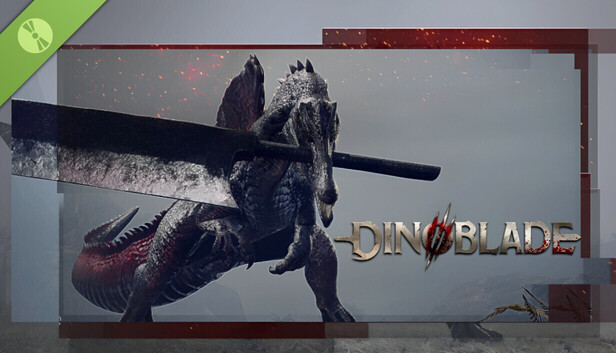
Progression in Dinoblade is heavily tied to both traditional stat leveling and a specialized, visually spectacular Soul Arts skill tree. Players use collected SP (Soul Points) from defeating enemies to increase core combat attributes at Save Stones: Health, Stamina, Resonance (the game's equivalent to mana or skill fuel), and overall Damage. Additionally, the Soul Arts tree features unlockable active abilities that can completely change the pace of combat, such as the devastating 'Meteor Dash' or the area-of-effect 'Meteor Zone'. Resonance powers these anime-inspired abilities and temporary combat buffs. Weapons also play a massive role in a player's upgrade path, as different greatswords provide unique heavy combos and specialized attacks when their specific conditions are met during a fight. |
| public World & Exploration | |
| World & Level Design | |
|
The known game universe is currently segmented into distinct geographic biomes known as Sectors, blending procedural generation with handcrafted boss arenas. Sector 1, Elysia, features arid deserts, sprawling alien tendril ecosystems, and oases that climax at the heavily fortified Fortress Bunker. Sector 2, Auryto, introduces massive logistical bottlenecks, mutated environments, and Infested Nests populated by aggressive alien wildlife. Sector 3, Serina, represents the brutal Early Access endgame, demanding mastery of supply chains and culminating in an intense bullet-hell encounter against the Serina Fortress. A highly anticipated Sector 4 remains locked in the game files, slated for the official 1.0 release, and promises entirely new environmental hazards and massive co-op integrated raid layouts. |
The world of Dinoblade is structured as a series of sprawling, interconnected linear levels rather than a traditional, sprawling open world map. Each region acts as its own distinct biome, filled with hidden side paths, areas for gathering resources, and environmental storytelling. The known regions include the arid and dangerous Dry Canyons, the misty and overgrown jungles, the perilous Red Ashy Swamp, and the vast expanses of the Great Lake. Each zone culminates in a highly challenging Alpha Boss encounter that blocks progression to the next area. While the main path is relatively straightforward to follow, thorough exploration of the environment highly rewards players with extra skill points (SP), vital upgrade crystals for health items, and hidden legendary weapons. |
| Playable Vehicles | |
|
N/A |
| Notable Fauna/Mounts | |
|
|
| book Story & Characters | |
| Main Characters | |
|
|
| Example Missions | |
|
|
| people Multiplayer | |
| Multiplayer Details | |
|
As of September 2026, Pax Autocratica operates strictly as a single-player hybrid simulation. However, the most universally demanded feature by the game's expansive 500,000-wishlist community is collaborative gameplay. Multiverse has officially confirmed that Co-Op Multiplayer is structurally confirmed for future deployment. The studio is currently undertaking the massive technical hurdle of refactoring their IL2CPP Unity architecture to support synchronized multiplayer instances. This highly anticipated mode will allow multiple commanders to jointly manage complex logistical supply chains, optimize base layouts, and deploy as a fully unified squad into massive Sector Overlord raid encounters, fundamentally shifting the game's dynamic. |
Dinoblade is designed from the ground up as a strictly single-player, heavily narrative and combat-driven Soulslike experience. There are absolutely no cooperative multiplayer modes, phantom invasions, or competitive PvP arenas included in the game. The solo developer chose to focus entirely on creating tightly balanced, highly polished 1-on-1 melee combat mechanics and elaborate, multi-phase boss encounters that simply do not account for the variables of multiple players. The intense isolation of the single-player journey is a core part of the game's harsh atmospheric tone, ensuring that the difficulty curve remains notoriously punishing but always fair for a lone Spinosaurus battling against overwhelming apocalyptic odds. |
| extension Editions & DLC | |
| Available Editions | |
|
Pax Autocratica was released as a unified Early Access edition on PC platforms, purposefully avoiding fragmented launch tiers to consolidate player feedback. The standard MSRP sits at $29.99, though it launched with an introductory discount of $24.89, driving rapid market penetration of over 100,000 units in its first week. Players who participated in the one-month anniversary 'Auroria Day' event were rewarded with the exclusive Nebula Assault Rifle - Aurorian Ceremonial Series cosmetic weapon skin. While the developers have not yet announced Deluxe or Ultimate editions, the eventual 1.0 release is expected to feature a robust Supporter Pack offering digital artbooks, developmental post-mortems, and expanded cosmetic insignias for colony structures. |
Currently, Dinoblade is exclusively available in a single Standard Edition on the Steam digital storefront, priced at a very accessible entry point of around $20. As a passion project crafted primarily by a solo developer, there are no complicated tiered pre-orders, premium deluxe editions, or in-game microtransactions at launch. The developer, Jean Nguyen, has emphasized a straightforward, highly player-friendly release strategy that focuses purely on delivering a complete game. While there is no official roadmap for special editions at this time, the community has highly requested a digital artbook and an original soundtrack release, which could potentially be bundled as a Deluxe Upgrade in the future if the game sustains its massive launch momentum. |
| Post-Launch Content / DLC | |
|
The developer Multiverse operates a highly aggressive two-year Early Access roadmap. To date, patches like Directive ST-11 have fundamentally overhauled base building with batch dismantling, drone logic, and UI scaling. Looking forward, the community has confirmed through data-mining and developer AMAs that the future includes highly anticipated features such as Co-Op Multiplayer, natively synchronized colony management, and extensive Sector 4 expansion raids. Furthermore, the team is actively prototyping player-suggested Core Fragments (like Quantum Immortality and Medical Drones) and completely overhauling the social simulation with 'Player Marriage' mechanics and a 'Prisoner Conversion V2' system to deepen the sociopolitical management layers before the official 1.0 launch. |
Following its highly successful and viral launch, Dinoblade's immediate post-launch support is focused primarily on technical stabilization, PC optimization, and resolving minor gameplay bugs. The developer has already introduced a highly requested 'Boss Rush Mode' in the release build, allowing hardcore players to re-challenge the game's toughest encounters back-to-back for ultimate bragging rights. Looking further ahead, the developer has openly discussed the exciting potential for future expansions or premium DLC that could introduce completely new playable dinosaur species. These potential additions would feature distinctly different weapons and entirely unique combat styles compared to the Spinosaurus, though these ideas currently remain in the early conceptual planning stages. |
| help_outline FAQ | |
| Frequently Asked Questions | |
|
|
| build Technical Details | |
| Graphics & Visual Fidelity | |
|
Built on the Unity Engine, Pax Autocratica features a stark, stylized graphical approach that highlights the grim reality of space colonization. The visual language heavily relies on contrasting elements: the sterile, mechanized Brutalist architecture of your expanding Command Center against the organic, mutated flesh of the Scourgeborn enemies. Recent graphical updates have completely overhauled visual clarity, modifying the physical proportions of enemy units for better readability and significantly upgrading the particle effects of abilities like the Void Detonation core. The engine handles hundreds of simultaneous lighting sources during combat, necessitating the option to disable volumetric fog and screen-space reflections for users prioritizing pure mechanical framerate over visual fidelity. |
Visually, Dinoblade punches incredibly far above its weight class for an indie title. Developed solely by a veteran animator with extensive experience on major AAA games like Ghost of Tsushima, the game boasts incredibly fluid, realistic, and dynamic combat animations. The Spinosaurus protagonist moves with a highly believable sense of weight and physical momentum, completely selling the absurd premise of holding a giant metal sword in its jaws. The game's environments are richly detailed, ranging from the sun-baked, cracked rocks of the Dry Canyons to the dense, volumetric fog of the misty jungles. Dynamic lighting, motion blur, and intense particle effects shine brightest during combat, especially when utilizing flashy, anime-inspired abilities. |
| Audio & Soundtrack | |
|
The auditory soundscape of Pax Autocratica bridges the sterile, bureaucratic hum of an authoritarian dystopia with the frantic, explosive sound design of an arcade shooter. The game features highly granular audio settings, providing players with distinct custom volume controls for varying audio streams including weapons fire, AI chatter, ambient machinery, and environmental effects. Fully compatible with stereo and surround sound configurations, the audio engine is designed to provide acute spatial awareness, alerting the player to the teleporting strikes of Sattleri Warriors or the incoming barrage of Overlord flak cannons. The music shifts dynamically, maintaining a tense, pulsing industrial synth beat during base management that explodes into chaotic orchestral arrangements during Sector Boss encounters. |
The audio presentation in Dinoblade works to create a harsh, primitive, yet intensely cinematic atmosphere. While the early sound design has been noted by some reviewers as occasionally inconsistent—with some abilities lacking a heavy sense of auditory impact—the overall musical score delivers sweeping, epic orchestral tracks during the major boss battles that elevate the tension perfectly. Character dialogue is handled through a unique, eerie telepathic presentation with subtitles rather than traditional voice acting, fitting the bizarre concept of highly evolved, soul-bound dinosaurs. The deafening clash of giant metal blades, the terrifying roars of the alpha predators, and the heavy atmospheric ambiance are central to the game's sensory identity. |
| User Interface (UI/UX) | |
|
Navigating a complex totalitarian bureaucracy requires a dense but functional User Interface. Directive ST-11 completely overhauled the UI to improve controller accessibility for gamepad and Steam Deck users, fixing critical icon switching errors and remapping radial menus. The interface features a streamlined Soldier Management screen with class-based sorting protocols, allowing commanders to easily track the loyalty, fear, and fatigue of their populace. The UI also integrates unified chat logs to prevent clutter from repetitive item pickups and features critical safety warnings if a player attempts to launch an expedition without essential medical or revival consumables. Hover tooltips can be temporarily hidden via trigger inputs to clear up screen real estate. |
The user interface in Dinoblade is purposely designed to be minimal and unobtrusive, keeping the player's primary focus firmly on the high-fidelity combat animations and crucial enemy environmental cues. The HUD features standard Action RPG elements: a highly visible health bar, a stamina gauge that is absolutely critical for managing dodges and blocks, and a Resonance meter used to execute powerful Soul Arts. A quick-select menu on the d-pad or keyboard allows for the rapid consumption of health stones and on-the-fly weapon swapping. During boss fights, a prominent stagger/resolve bar appears directly under the boss's massive health pool, heavily encouraging players to execute perfect parries to open the enemy up for massive critical finishers. |
| Accessibility Options | |
|
Multiverse has made a concerted effort to ensure the highly demanding mechanics of Pax Autocratica remain accessible. The title features fully adjustable difficulty sliders—Relaxed, Standard, and Demanding—which can be altered dynamically in the middle of a campaign without voiding the save data or penalizing the player. Recognizing controller struggles, recent patches massively improved Steam Deck and gamepad integration, optimizing the layout of the complex base-building menus. To reduce intense gameplay frustration, a 'capture pity' system guarantees enemy capture after a set number of failures, while visual adjustments to hit-reactions and enemy status effects allow players with visual processing difficulties to better read the chaotic battlefield states. |
As a hardcore, skill-based Soulslike, Dinoblade’s accessibility options are somewhat limited, leaning heavily into the genre's notoriously steep and punishing difficulty curve. However, the game does offer fully remappable controls for both keyboard/mouse setups and standard gamepads, ensuring players can find a comfortable layout. There are options to adjust the UI scale and increase subtitle size to aid readability during the game's telepathic dialogue sequences. Standard visual sliders for brightness, contrast, and field of view are available, and players can tweak camera sensitivity and lock-on behavior. There are currently no explicit difficulty sliders or invincibility modes, as mastering the parry and dodge timings is essential to the core design. |
| video_library Media Links | |
| Gameplay Video | |
| launchWatch | launchWatch |
| Walkthrough/Guide | |
| launchView | launchView |
| settings_applications System Requirements | |
| 1080p (Full HD) - Recommended (High Settings, 60 FPS) CPU: Provides enough processing headroom for complex enemy AI and smooth 60 FPS combat. CPU (Laptop): Strong multi-core performance to prevent frame drops during intense boss encounters. GPU: Offers excellent 1080p performance, handling high-resolution textures and particle effects easily. GPU (Laptop): Easily matches the desktop recommendation, ensuring smooth and fluid combat animations. RAM: Ensures no memory bottlenecks, allowing for seamless background asset loading. Storage: An SSD is recommended to significantly reduce loading times and asset pop-in. | |
| — | memoryCPU: Intel Core i7-9700K / AMD Ryzen 5 3600 developer_boardGPU: NVIDIA GeForce GTX 1660 Super / AMD Radeon RX 5600 XT laptop_macCPU (L): Intel Core i7-10750H / AMD Ryzen 7 4800H laptop_windowsGPU (L): NVIDIA GeForce RTX 3060 Mobile (High TGP) layersRAM: 16 GB saveStorage (Tier): 13 GB SSD |
| 1080p (Full HD) - Minimum (Low-Medium Settings, 30-60 FPS) CPU: Baseline required to manage colony pathfinding without freezing. CPU (Laptop): Must maintain high base clocks to avoid simulation lag. GPU: Adequate for rendering the primary colony and Sector 1 environments. GPU (Laptop): Will require FSR on Balanced mode to sustain 60 FPS in dense firefights. RAM: Strict 16GB minimum due to simultaneous logistics and FPS memory pools. Storage: SSD strongly recommended for seamless transitions. | |
memoryCPU: Intel Core i5-8600 / AMD Ryzen 5 1600 developer_boardGPU: Nvidia GTX 1060 (6GB) / AMD RX 480 (6GB) laptop_macCPU (L): Intel Core i5-10300H / AMD Ryzen 5 4600H laptop_windowsGPU (L): Nvidia GTX 1650 Ti / RTX 3050 (High TGP) layersRAM: 16 GB saveStorage (Tier): 40 GB HDD/SSD | memoryCPU: Intel Core i5-7500 / AMD Ryzen 5 1600 developer_boardGPU: NVIDIA GeForce GTX 1050 (4GB) / AMD Radeon RX 560 laptop_macCPU (L): Intel Core i5-9300H / AMD Ryzen 5 3550H laptop_windowsGPU (L): NVIDIA GeForce GTX 1650 Mobile layersRAM: 4 GB saveStorage (Tier): 13 GB |
| 1440p (QHD/2K) - Recommended (High Settings, 60+ FPS) CPU: Provides necessary multi-core performance for late-game population calculations. CPU (Laptop): Handles the physics calculations of overlapping projectile patterns effectively. GPU: Maintains fluid framerates during intense bullet-hell boss encounters. GPU (Laptop): Comfortably handles 1440p internal resolution with mild upscaling. RAM: Sufficient for holding high-resolution textures in memory. Storage: Crucial for rapid asset streaming. | |
memoryCPU: Intel Core i7-8700K / AMD Ryzen 5 3600 developer_boardGPU: Nvidia RTX 2060 Super / AMD RX 5700 XT laptop_macCPU (L): Intel Core i7-11800H / AMD Ryzen 7 5800H laptop_windowsGPU (L): Nvidia RTX 3060 / 4050 Mobile (90W+) layersRAM: 16 GB saveStorage (Tier): 40 GB NVMe SSD | — |
| 2160p (UHD/4K) - Ultra (Epic Settings, 60+ FPS) CPU: Ensures absolutely no bottlenecking when managing late-game automated drone swarms and maximum ESL spawns. CPU (Laptop): Desktop-replacement grade CPUs are necessary for flawless 4K logic processing. GPU: Required to brute-force 4K rendering alongside complex lighting and chain-lightning physics. GPU (Laptop): Highest TGP needed to prevent frame drops during Sector 3 flak barrages. RAM: Provides extra overhead for extended play sessions and modding tools. Storage: Eliminates all load times between phases. | |
memoryCPU: Intel Core i7-12700K / AMD Ryzen 7 7800X3D developer_boardGPU: Nvidia RTX 3080 / AMD Radeon RX 6800 XT laptop_macCPU (L): Intel Core i9-13900HX / AMD Ryzen 9 7945HX laptop_windowsGPU (L): Nvidia RTX 4080 Mobile (175W) layersRAM: 32 GB saveStorage (Tier): 40 GB Gen4 NVMe SSD | — |
| save Overall Storage | |
| Spec: 40 GB Note: Requires 40 GB of storage space. An SSD is highly recommended to prevent hitching during fast travel between the colony and FPS expeditions. Type: Unknown | Spec: 13 GB available space Note: An SSD is highly recommended for fast asset streaming and reducing load times after player deaths. Type: Unknown |
| desktop_windows Operating System | |
| Spec: Windows 10 (64-bit) Explanation: Required to handle the multi-threading overhead of the demographic simulation and Unity IL2CPP backend. | Spec: Windows 10 / 11 (64-bit) Explanation: A modern 64-bit Windows operating system is required to handle the game's memory management and engine APIs. |
| gamepad DirectX Version | |
Spec: DirectX 11 (Default) / DirectX 12 (Optional) Explanation: DX11 is default. Forcing -dx12 via launch options spreads draw calls across all CPU cores, yielding up to a 100% framerate increase on high-end hardware, despite initial shader stutter. | Spec: DirectX 12 Explanation: Required for advanced lighting, rendering features, and modern hardware optimization. |
| info_outline Other Game Notes | |
|
|
| build Optimization Details | |
|
|
| laptop Laptop Considerations | |
|
|

info_outline Feature details based on available data. System requirements and performance estimates may vary.
laptop_chromebook Laptop Recommendations
Common Recommendations (Handles All Compared Games)

- memory Intel Core i7-12700H
- developer_board NVIDIA GeForce RTX 3070
- layers 32GB DDR4-3200MHz
- track_changes Target GPU: Nvidia GTX 1650 Ti / RTX 3050 (High TGP) / NVIDIA GeForce GTX 1650 Mobile

- memory Intel Core i9-13900H
- developer_board NVIDIA GeForce RTX 4060
- layers 16GB DDR5-5200MHz
- track_changes Target GPU: Nvidia GTX 1650 Ti / RTX 3050 (High TGP) / NVIDIA GeForce GTX 1650 Mobile

- memory Intel Core i9-14900HX
- developer_board NVIDIA GeForce RTX 4060
- layers 32GB DDR5-5600MHz
- track_changes Target GPU: Nvidia GTX 1650 Ti / RTX 3050 (High TGP) / NVIDIA GeForce GTX 1650 Mobile

- memory AMD Ryzen 7 7445HS
- developer_board NVIDIA GeForce RTX 4050
- layers 16GB (2x8GB) DDR5 5600MHz SO-DIMM
- track_changes Target GPU: Nvidia RTX 3060 / 4050 Mobile (90W+)

- memory AMD Ryzen 7 7445HS
- developer_board NVIDIA GeForce RTX 4050
- layers 16GB DDR5 5600MHz SO-DIMM
- track_changes Target GPU: Nvidia RTX 3060 / 4050 Mobile (90W+)

- memory Intel Core i9-14900HX
- developer_board NVIDIA GeForce RTX 4080 Laptop GPU
- layers 64 GB DDR5-5600MHz
- track_changes Target GPU: Nvidia RTX 3060 / 4050 Mobile (90W+)
- memory Intel Core i9-14900HX
- developer_board NVIDIA GeForce RTX 4080 Laptop GPU
- layers 64 GB DDR5-5600MHz
- track_changes Target GPU: Nvidia RTX 4080 Mobile (175W)

- memory Intel Core Ultra 9 Processor 275HX (Series 2)
- developer_board NVIDIA GeForce RTX 5070 Laptop GPU
- layers 32GB DDR5-5600MHz
- track_changes Target GPU: Nvidia RTX 4080 Mobile (175W)

- memory Intel Core i9-14900HX Processor
- developer_board NVIDIA GeForce RTX 5070 Laptop GPU
- layers 32GB DDR5-5600MHz
- track_changes Target GPU: Nvidia RTX 4080 Mobile (175W)
For Pax Autocratica Specifically
- memory Intel Core i7-12700H
- developer_board NVIDIA GeForce RTX 3070
- layers 32GB DDR4-3200MHz
- track_changes Target GPU: Nvidia GTX 1060 (6GB) / AMD RX 480 (6GB)
- memory Intel Core i9-13900H
- developer_board NVIDIA GeForce RTX 4060
- layers 16GB DDR5-5200MHz
- track_changes Target GPU: Nvidia GTX 1060 (6GB) / AMD RX 480 (6GB)
- memory Intel Core i9-14900HX
- developer_board NVIDIA GeForce RTX 4060
- layers 32GB DDR5-5600MHz
- track_changes Target GPU: Nvidia GTX 1060 (6GB) / AMD RX 480 (6GB)

- memory Intel Core i9-12900H
- developer_board NVIDIA GeForce RTX 3070 Ti
- layers 16GB DDR5-4800MHz
- track_changes Target GPU: Nvidia GTX 1060 (6GB) / AMD RX 480 (6GB)

- memory Intel Core i5-12450H
- developer_board NVIDIA GeForce RTX 3050
- layers 16GB DDR4-3200MHz
- track_changes Target GPU: Nvidia GTX 1060 (6GB) / AMD RX 480 (6GB)

- memory Intel Core i5-12500H
- developer_board NVIDIA GeForce RTX 3050 Ti
- layers 16GB DDR4-3200MHz
- track_changes Target GPU: Nvidia GTX 1060 (6GB) / AMD RX 480 (6GB)

- memory AMD Ryzen 7 7435HS
- developer_board NVIDIA GeForce RTX 3050
- layers 32GB DDR5-4800MHz
- track_changes Target GPU: Nvidia GTX 1060 (6GB) / AMD RX 480 (6GB)

- memory AMD Ryzen 7 6800H
- developer_board NVIDIA GeForce RTX 3060
- layers 16GB DDR5-4800MHz
- track_changes Target GPU: Nvidia GTX 1060 (6GB) / AMD RX 480 (6GB)

- memory AMD Ryzen 9 5900HS
- developer_board NVIDIA GeForce RTX 3080
- layers 16GB DDR4-3200MHz
- track_changes Target GPU: Nvidia GTX 1060 (6GB) / AMD RX 480 (6GB)

- memory Intel Core i7-13620H
- developer_board NVIDIA GeForce RTX 4070
- layers 16GB DDR5-4800MHz
- track_changes Target GPU: Nvidia GTX 1060 (6GB) / AMD RX 480 (6GB)
- memory AMD Ryzen 7 7445HS
- developer_board NVIDIA GeForce RTX 4050
- layers 16GB (2x8GB) DDR5 5600MHz SO-DIMM
- track_changes Target GPU: Nvidia RTX 2060 Super / AMD RX 5700 XT
- memory AMD Ryzen 7 7445HS
- developer_board NVIDIA GeForce RTX 4050
- layers 16GB DDR5 5600MHz SO-DIMM
- track_changes Target GPU: Nvidia RTX 2060 Super / AMD RX 5700 XT
- memory Intel Core i9-14900HX
- developer_board NVIDIA GeForce RTX 4080 Laptop GPU
- layers 64 GB DDR5-5600MHz
- track_changes Target GPU: Nvidia RTX 2060 Super / AMD RX 5700 XT

- memory Intel Core i7-13620H
- developer_board NVIDIA GeForce RTX 5070 Laptop GPU
- layers 64GB (2x32GB) DDR5 4800MHz SO-DIMM
- track_changes Target GPU: Nvidia RTX 2060 Super / AMD RX 5700 XT

- memory AMD Ryzen 7 6800HS
- developer_board NVIDIA GeForce RTX 5070 Laptop GPU
- layers 16GB (2x8GB) DDR4 4800MHz SO-DIMM
- track_changes Target GPU: Nvidia RTX 2060 Super / AMD RX 5700 XT
- memory Intel Core Ultra 9 Processor 275HX (Series 2)
- developer_board NVIDIA GeForce RTX 5070 Laptop GPU
- layers 32GB DDR5-5600MHz
- track_changes Target GPU: Nvidia RTX 2060 Super / AMD RX 5700 XT
- memory Intel Core i9-14900HX Processor
- developer_board NVIDIA GeForce RTX 5070 Laptop GPU
- layers 32GB DDR5-5600MHz
- track_changes Target GPU: Nvidia RTX 2060 Super / AMD RX 5700 XT

- memory Intel Core i9-14900HX Processor
- developer_board NVIDIA GeForce RTX 5070 Laptop GPU
- layers 32GB DDR5-5600MHz
- track_changes Target GPU: Nvidia RTX 2060 Super / AMD RX 5700 XT

- memory Intel Core Ultra 9 Processor 285H
- developer_board NVIDIA GeForce RTX 5070 Laptop GPU
- layers 16GB DDR5-5600MHz
- track_changes Target GPU: Nvidia RTX 2060 Super / AMD RX 5700 XT

- memory Intel Core Ultra 9 285H (Arrow Lake-H)
- developer_board NVIDIA GeForce RTX 5070 Laptop GPU
- layers 64GB LPDDR5x-8533MT/s (LPCAMM2)
- track_changes Target GPU: Nvidia RTX 2060 Super / AMD RX 5700 XT
- memory Intel Core i9-14900HX
- developer_board NVIDIA GeForce RTX 4080 Laptop GPU
- layers 64 GB DDR5-5600MHz
- track_changes Target GPU: Nvidia RTX 3080 / AMD Radeon RX 6800 XT
- memory Intel Core Ultra 9 Processor 275HX (Series 2)
- developer_board NVIDIA GeForce RTX 5070 Laptop GPU
- layers 32GB DDR5-5600MHz
- track_changes Target GPU: Nvidia RTX 3080 / AMD Radeon RX 6800 XT
- memory Intel Core i9-14900HX Processor
- developer_board NVIDIA GeForce RTX 5070 Laptop GPU
- layers 32GB DDR5-5600MHz
- track_changes Target GPU: Nvidia RTX 3080 / AMD Radeon RX 6800 XT
- memory Intel Core i9-14900HX Processor
- developer_board NVIDIA GeForce RTX 5070 Laptop GPU
- layers 32GB DDR5-5600MHz
- track_changes Target GPU: Nvidia RTX 3080 / AMD Radeon RX 6800 XT
- memory Intel Core Ultra 9 285H (Arrow Lake-H)
- developer_board NVIDIA GeForce RTX 5070 Laptop GPU
- layers 64GB LPDDR5x-8533MT/s (LPCAMM2)
- track_changes Target GPU: Nvidia RTX 3080 / AMD Radeon RX 6800 XT

- memory Intel Core i9-14900HX
- developer_board NVIDIA GeForce RTX 4080
- layers 64GB DDR5-5600MHz
- track_changes Target GPU: Nvidia RTX 3080 / AMD Radeon RX 6800 XT

- memory Intel Core i9-14900HX
- developer_board NVIDIA GeForce RTX 4080
- layers 32GB DDR5-5600MHz
- track_changes Target GPU: Nvidia RTX 3080 / AMD Radeon RX 6800 XT

- memory Intel Core i9-14900HX
- developer_board NVIDIA GeForce RTX 4080
- layers 32GB DDR5-5600MHz
- track_changes Target GPU: Nvidia RTX 3080 / AMD Radeon RX 6800 XT

- memory Intel Core i9-14900HX
- developer_board NVIDIA GeForce RTX 4080
- layers 32GB DDR5-5600MHz
- track_changes Target GPU: Nvidia RTX 3080 / AMD Radeon RX 6800 XT

- memory AMD Ryzen 9 7845HX
- developer_board NVIDIA GeForce RTX 4080
- layers Up to 64GB DDR5
- track_changes Target GPU: Nvidia RTX 3080 / AMD Radeon RX 6800 XT
For Dinoblade Specifically
- memory Intel Core i7-12700H
- developer_board NVIDIA GeForce RTX 3070
- layers 32GB DDR4-3200MHz
- track_changes Target GPU: NVIDIA GeForce GTX 1050 (4GB) / AMD Radeon RX 560
- memory Intel Core i9-13900H
- developer_board NVIDIA GeForce RTX 4060
- layers 16GB DDR5-5200MHz
- track_changes Target GPU: NVIDIA GeForce GTX 1050 (4GB) / AMD Radeon RX 560
- memory Intel Core i9-14900HX
- developer_board NVIDIA GeForce RTX 4060
- layers 32GB DDR5-5600MHz
- track_changes Target GPU: NVIDIA GeForce GTX 1050 (4GB) / AMD Radeon RX 560
- memory Intel Core i9-12900H
- developer_board NVIDIA GeForce RTX 3070 Ti
- layers 16GB DDR5-4800MHz
- track_changes Target GPU: NVIDIA GeForce GTX 1050 (4GB) / AMD Radeon RX 560
- memory Intel Core i5-12450H
- developer_board NVIDIA GeForce RTX 3050
- layers 16GB DDR4-3200MHz
- track_changes Target GPU: NVIDIA GeForce GTX 1050 (4GB) / AMD Radeon RX 560
- memory Intel Core i5-12500H
- developer_board NVIDIA GeForce RTX 3050 Ti
- layers 16GB DDR4-3200MHz
- track_changes Target GPU: NVIDIA GeForce GTX 1050 (4GB) / AMD Radeon RX 560
- memory AMD Ryzen 7 7435HS
- developer_board NVIDIA GeForce RTX 3050
- layers 32GB DDR5-4800MHz
- track_changes Target GPU: NVIDIA GeForce GTX 1050 (4GB) / AMD Radeon RX 560
- memory AMD Ryzen 7 6800H
- developer_board NVIDIA GeForce RTX 3060
- layers 16GB DDR5-4800MHz
- track_changes Target GPU: NVIDIA GeForce GTX 1050 (4GB) / AMD Radeon RX 560
- memory AMD Ryzen 9 5900HS
- developer_board NVIDIA GeForce RTX 3080
- layers 16GB DDR4-3200MHz
- track_changes Target GPU: NVIDIA GeForce GTX 1050 (4GB) / AMD Radeon RX 560
- memory Intel Core i7-13620H
- developer_board NVIDIA GeForce RTX 4070
- layers 16GB DDR5-4800MHz
- track_changes Target GPU: NVIDIA GeForce GTX 1050 (4GB) / AMD Radeon RX 560

- memory Intel Core i7-14700HX
- developer_board NVIDIA GeForce RTX 4070
- layers 16GB DDR5-5600MHz
- track_changes Target GPU: NVIDIA GeForce GTX 1660 Super / AMD Radeon RX 5600 XT

- memory Intel Core i9-14900HX
- developer_board NVIDIA GeForce RTX 4070
- layers 32GB DDR5-5600MHz
- track_changes Target GPU: NVIDIA GeForce GTX 1660 Super / AMD Radeon RX 5600 XT
info_outline Laptop recommendations are estimates based on available component benchmarks and game requirements. Actual performance may vary depending on settings, drivers, cooling, power limits, etc. Prices and availability subject to change. As an Amazon Associate, we earn from qualifying purchases.