Select Games to Compare

search close
search close

Select up to 2 games to compare side-by-side.

Dinoblade vs Black Myth: Wukong

close close
info General Information
Release Date
Jul 23, 2026 Aug 20, 2024
Developer
Jean Nguyen / Team Spino LLC Game Science
Publisher
Team Spino LLC Game Science (Digital), PM Studios (Physical Distribution - select regions/editions)
Genre(s)
Action RPG / Soulslike Action RPG, Soulslike
Engine
Custom High-Fidelity 3D Engine Unreal Engine 5
stars Ratings & Price
Content Rating
T for Teen T (Teen 13+) - ESRB Descriptors: Blood and gore, L
Avg. User Rating
4.5 / 5.0 4.0 / 5.0
Current Price (USD)
$19.99 $59.99
tune Key Specs
Quick Highlights
  • Platforms: PC (Steam)
  • Game Modes: Single-player, Boss Rush Mode
  • Release Date: July 23, 2026
  • Perspective: Third-Person
  • Multiplayer: Single-player Only
  • Setting: Ancient China, Journey to the West Mythology
  • Platforms: PlayStation 5, Windows (PC - Steam, Epic Games Store), Xbox Series X/S (TBA), GeForce Now
  • Initial Release (PS5, PC): 2024-08-20
  • Unique Feature: Based on 'Journey to the West', stunning UE5 visuals, deep combat with staff stances, spells, and transformations, challenging Soulslike boss battles.
sports_esports Gameplay & Mechanics
Companions/Followers
  • Phantom Raptors: Distracts enemies and damages their resolve bar.
    Spirit Dinosaur
  • Ghost of Kasei: Executes a massive, fiery area-of-effect slam attack.
    Spirit Dinosaur
  • None (Primarily Solo): The game focuses on the Destined One's solo journey. While you might interact with NPCs or summon temporary allies through spells (like 'A Pluck of Many'), there are no persistent, controllable companions in the traditional RPG sense.
Key Collectibles
  • Upgrade Crystals: Hidden in remote corners of biomes like the Dry Canyons and Great Lake.
  • Ancient Soul Fragments: Scattered throughout the map, unlocking lore when collected.
  • Meditation Spots: Specific locations in the game world where the Destined One can meditate to gain skill points, used for unlocking or upgrading abilities in the skill trees.
  • Curios: Equippable accessory items found throughout the world or as rewards. They provide passive buffs, resistances, or unique gameplay effects. Example: Wind Chimes (Deluxe Edition).
  • Gourd Upgrades / Ingredients: Items related to customizing and enhancing the healing gourd, allowing players to choose different types of concoctions for health recovery or other temporary buffs. Ingredients for crafting these are likely found via exploration and defeating enemies.
  • Celestial Medicines / Attribute Enhancers: Rare consumables or items that permanently increase the Destined One's core attributes like health, mana (for spells), or stamina (Focus Points for staff techniques).
  • Relics: Key story items or powerful artifacts collected after major boss fights or chapter completions, potentially granting significant passive bonuses or unlocking new progression paths. The main quest involves collecting relics tied to Sun Wukong.
  • Lore Items / Story Fragments: Objects, scrolls, or environmental details that provide deeper insights into the game's narrative, the mythology of the world, and the backstories of characters and enemies.
Key Themes
  • Prehistoric
  • Dark Fantasy
  • Post-Apocalyptic
  • Survival
  • Martial Arts
  • Chinese Mythology
  • Journey to the West
  • Martial Arts
  • Transformation
  • Buddhism
  • Taoism
  • Moral Ambiguity
  • Nature & Mysticism
  • Fate vs. Free Will
  • Illusion vs. Reality
  • Folklore
colorize Combat & Gear
Weapons Overview
  • Akai's First Blade: Greatsword
    The starting weapon acquired early on, offering a balanced mix of speed and damage.
  • Asteron Meteor End: Greatsword
    A powerful sword obtained from Kasei the Tyrant that creates rock-based AoE attacks.
  • Greybone Greatsword: Greatsword
    A slow but devastating heavy weapon found after defeating Mockasai the Titan.
  • Ancient Greatsword: Greatsword
    A technical weapon found in the Red Ashy Swamp that guarantees critical damage after a perfect deflect.
  • Akai Chainbound: Greatsword
    The ultimate weapon that sends out waves of dark energy after completing combos, obtained after the final boss.
  • The Staff (As-You-Will Cudgel / Ruyi Jingu Bang inspired): Primary Melee (Versatile Staff)
    The main weapon of the Destined One, a magical staff that can extend, shrink, and is used in conjunction with various combat stances (Smash, Pillar, Thrust). Its mastery is central to combat, allowing for a wide range of attacks, parries, and special moves.
  • Bronzecloud Staff: Weapon (Staff Variant)
    An exclusive staff weapon included in the Digital Deluxe Edition. Likely offers a unique appearance and potentially different starting stats or properties.
  • Transformed Abilities (as weapons): Situational Melee/Ranged/Special
    When transformed into various creatures or powerful beings, the Destined One gains access to their unique attacks and abilities, which serve as temporary 'weapons' or combat styles (e.g., a large demon's claws, a fire-breathing creature's breath).
Armor / Gear Sets
  • Spinosaurus Scales: Base natural defense; upgradable via health and stamina stats.
  • Folk Opera Armor Set: A cosmetic armor set included in the Digital Deluxe Edition, consisting of the Folk Opera Mask, Folk Opera Almsgiving Armor, Folk Opera Leather Bracers, and Folk Opera Buskins. Provides a distinct visual style.
  • Various Equipment Pieces: Players can equip different pieces of gear that likely influence stats such as defense, resistances, or provide passive bonuses. The game features distinct slots for equipment like masks, armor, bracers, and buskins.
Outfits/Customization
  • Cosmetic Scales: Changes the skin color and pattern of the Spinosaurus.
  • Folk Opera Outfit: A full cosmetic outfit included in the Digital Deluxe Edition, comprising a Mask, Almsgiving Armor, Leather Bracers, and Buskins. Offers a unique traditional opera-inspired aesthetic.
  • Default Attire (The Destined One): The primary appearance of the player character. It's likely that other armor pieces or outfits can be found or crafted in the game, affecting both appearance and stats, though extensive cosmetic customization beyond distinct sets isn't confirmed as a major feature.
trending_up Progression & Upgrades
Skills & Progression

Progression in Dinoblade is heavily tied to both traditional stat leveling and a specialized, visually spectacular Soul Arts skill tree. Players use collected SP (Soul Points) from defeating enemies to increase core combat attributes at Save Stones: Health, Stamina, Resonance (the game's equivalent to mana or skill fuel), and overall Damage. Additionally, the Soul Arts tree features unlockable active abilities that can completely change the pace of combat, such as the devastating 'Meteor Dash' or the area-of-effect 'Meteor Zone'. Resonance powers these anime-inspired abilities and temporary combat buffs. Weapons also play a massive role in a player's upgrade path, as different greatswords provide unique heavy combos and specialized attacks when their specific conditions are met during a fight.

N/A
public World & Exploration
World & Level Design

The world of Dinoblade is structured as a series of sprawling, interconnected linear levels rather than a traditional, sprawling open world map. Each region acts as its own distinct biome, filled with hidden side paths, areas for gathering resources, and environmental storytelling. The known regions include the arid and dangerous Dry Canyons, the misty and overgrown jungles, the perilous Red Ashy Swamp, and the vast expanses of the Great Lake. Each zone culminates in a highly challenging Alpha Boss encounter that blocks progression to the next area. While the main path is relatively straightforward to follow, thorough exploration of the environment highly rewards players with extra skill points (SP), vital upgrade crystals for health items, and hidden legendary weapons.

Black Myth: Wukong is not an open-world game but features large, distinct levels divided into chapters, each with its own environmental theme (e.g., forests, deserts, snowy mountains). While levels offer branching paths and exploration, the overall progression is more linear, comparable in structure to games like Sekiro. The game does not provide a traditional player map, encouraging environmental observation. Fast travel is available via 'Keeper's Shrines' (checkpoints).

Playable Vehicles
N/A
  • None (Traversal by Foot/Abilities)
    Traversal in Black Myth: Wukong is primarily on foot, supplemented by the Destined One's acrobatic abilities, dodges, and potentially spells like 'Cloud Step'. There are no player-controlled vehicles in the traditional sense.
Notable Fauna/Mounts
  • Spinosaurus: Dinosaur
    Playable Protagonist
  • T-Rex: Dinosaur
    Elite Enemy / Alpha Predator
  • Raptors: Dinosaur
    Swarm Enemies / Summons
N/A
book Story & Characters
Main Characters
  • The Spinosaurus: Protagonist
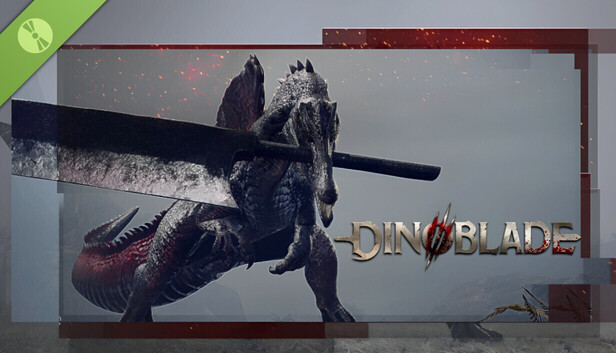
    A young Spinosaurus armed with a Great Sword, fighting to break the ancient curse.
  • Akai: Antagonist
    The final boss whose curse trapped dinosaur souls for centuries.
  • Kasei The Tyrant: Boss
    A brutal, hammer-wielding fire boss found in the Dry Canyons.
  • Kira the Exile: Boss
    The first boss of the game, a highly skilled sword-wielding dinosaur.
  • The Destined One: Protagonist / Monkey Warrior
    The main playable character, a skilled monkey warrior on a quest to uncover the truth behind the legend of Sun Wukong and the events of 'Journey to the West'. Wields a magical staff and can master various spells and transformations.
  • Sun Wukong (The Monkey King / Great Sage Equal to Heaven): Central Lore Figure / Legendary Hero
    The iconic protagonist of 'Journey to the West'. In Black Myth: Wukong, his legend is central to the plot, and the Destined One's journey is deeply intertwined with Wukong's past and fate.
  • Erlang Shen (Yang Jian): Antagonist / Major Boss / Celestial General
    A powerful deity from Chinese mythology, known for his third eye and formidable combat prowess. Appears as a major antagonist and challenging boss fight in the game.
  • Bull Demon King (Niu Mowang): Antagonist / Major Boss / Demon Lord
    A powerful demon lord from 'Journey to the West', an old acquaintance turned adversary of Sun Wukong. Features as a significant boss with his own domain and storyline.
  • Red Boy (Hong Hai'er): Antagonist / Major Boss / Fire-wielding Demon
    The son of the Bull Demon King and Princess Iron Fan, known for his mastery of Samadhi Fire. Appears as a challenging boss with a storyline connected to his parents.
  • Various Yaoguai (Demons & Monsters): Enemies / Bosses
    A diverse bestiary of demons, monsters, and spirits (Yaoguai) drawn from Chinese folklore and 'Journey to the West', each with unique designs, abilities, and backstories. They serve as common enemies and challenging boss encounters.
  • Zhu Bajie (Pigsy - Mentioned/Implied): Supporting Character (from lore)
    One of Sun Wukong's companions in 'Journey to the West'. While his direct prominent role in the game's plot for the 'Destined One' is less clear than Wukong's, he is a key figure from the source material.
Example Missions
  • Traverse the Dry Canyons: Main Quest
    Fight through waves of dinosaurs and defeat Kasei the Tyrant.
  • End the Curse: Final Boss / Main Quest
    Defeat Akai to free the trapped souls of the dinosaurs.
  • Boss Rush: Challenge Mode
    Defeat all major bosses back-to-back as fast as possible.
  • The Destined One's Journey (Main Campaign)
    A chapter-based main storyline where the player, as the Destined One, ventures through various mythical locations to uncover the truth behind Sun Wukong's legend and collect powerful relics. This involves navigating challenging environments, solving light puzzles, and defeating numerous enemies and powerful bosses inspired by 'Journey to the West'.
  • Yaoguai Hunts / Boss Battles
    Confronting and defeating a wide array of Yaoguai (demons/monsters), including over 70-80 distinct boss encounters. Each boss typically has multiple phases and unique attack patterns, requiring strategic use of stances, spells, and transformations. Defeating them often yields new abilities (Spirit Skills) or key items.
  • Exploration and Secret Finding
    Traversing large, detailed levels to discover hidden paths, optional boss fights, collectibles (like Meditation Spots, Curios, Gourds), lore entries, and upgrade materials. The game encourages thorough exploration of its distinct environments.
  • Mastering Abilities and Transformations
    Acquiring and upgrading a variety of spells, staff stances, and transformation abilities. Certain encounters or environmental challenges may require specific abilities or transformations to overcome, encouraging experimentation and mastery of the available toolkit.
people Multiplayer
Multiplayer Details

Dinoblade is designed from the ground up as a strictly single-player, heavily narrative and combat-driven Soulslike experience. There are absolutely no cooperative multiplayer modes, phantom invasions, or competitive PvP arenas included in the game. The solo developer chose to focus entirely on creating tightly balanced, highly polished 1-on-1 melee combat mechanics and elaborate, multi-phase boss encounters that simply do not account for the variables of multiple players. The intense isolation of the single-player journey is a core part of the game's harsh atmospheric tone, ensuring that the difficulty curve remains notoriously punishing but always fair for a lone Spinosaurus battling against overwhelming apocalyptic odds.

Black Myth: Wukong is a single-player action RPG. There are no official multiplayer modes in the base game. A third-party multiplayer mod (WukongMP) has been developed by the community, offering unofficial PvP and planned co-op.

extension Editions & DLC
Available Editions

Currently, Dinoblade is exclusively available in a single Standard Edition on the Steam digital storefront, priced at a very accessible entry point of around $20. As a passion project crafted primarily by a solo developer, there are no complicated tiered pre-orders, premium deluxe editions, or in-game microtransactions at launch. The developer, Jean Nguyen, has emphasized a straightforward, highly player-friendly release strategy that focuses purely on delivering a complete game. While there is no official roadmap for special editions at this time, the community has highly requested a digital artbook and an original soundtrack release, which could potentially be bundled as a Deluxe Upgrade in the future if the game sustains its massive launch momentum.

Available editions include: Digital Standard Edition ($59.99 USD), Digital Deluxe Edition ($69.99 USD - includes base game, Bronzecloud Staff weapon, Folk Opera Mask, Folk Opera Almsgiving Armor, Folk Opera Leather Bracers, Folk Opera Buskins, Wind Chimes curio, and selected digital soundtrack). Physical Deluxe Edition (PC, $169 USD) and Collector's Edition (PC, $399 USD - includes a 40cm Wukong figurine) have also been available, though primarily for PC and potentially with regional limitations. Pre-order bonus was the Trailblazer's Scarlet Gourd.

Post-Launch Content / DLC

Following its highly successful and viral launch, Dinoblade's immediate post-launch support is focused primarily on technical stabilization, PC optimization, and resolving minor gameplay bugs. The developer has already introduced a highly requested 'Boss Rush Mode' in the release build, allowing hardcore players to re-challenge the game's toughest encounters back-to-back for ultimate bragging rights. Looking further ahead, the developer has openly discussed the exciting potential for future expansions or premium DLC that could introduce completely new playable dinosaur species. These potential additions would feature distinctly different weapons and entirely unique combat styles compared to the Spinosaurus, though these ideas currently remain in the early conceptual planning stages.

An expansion for Black Myth: Wukong is reportedly in development. The game has received post-launch patches for performance improvements, bug fixes, and new features like DLSS 4.0 support and additional language options (e.g., Thai).

help_outline FAQ
Frequently Asked Questions
  • Q: Is Dinoblade available on consoles?
    A: Currently, Dinoblade is only available on PC via Steam. The developer has expressed interest in a PS5 port in the future.
  • Q: Does Dinoblade have multiplayer?
    A: No, Dinoblade is a strictly single-player Soulslike experience focused on challenging 1v1 combat.
  • Q: Can you play as other dinosaurs?
    A: At launch, the Spinosaurus is the only playable character. However, the developer has plans to potentially add other playable dinosaurs with unique weapons in the future.
  • Q: How do you heal in Dinoblade?
    A: Players use Health Stones, which function similarly to Estus Flasks in Dark Souls. You can increase your maximum charges by finding Upgrade Crystals hidden in the world.
  • Q: How do I fix low FPS or crashing in Dinoblade?
    A: Ensure your graphics drivers are fully updated for a clean shader cache. Disabling the Steam Overlay has also been shown to reduce micro-stutters during heavy combat.
  • Q: What is Black Myth: Wukong?
    A: Black Myth: Wukong is an action RPG based on the classic Chinese novel 'Journey to the West'. Players control the 'Destined One,' a monkey warrior, and embark on a quest to uncover hidden truths, battling formidable foes using staff combat, spells, and transformations.
  • Q: When was Black Myth: Wukong released?
    A: Black Myth: Wukong was released on August 20, 2024, for PlayStation 5 and Windows (PC). The Xbox Series X/S version is planned for a later date.
  • Q: What platforms is Black Myth: Wukong available on?
    A: Currently, it's available on PlayStation 5 and PC (via Steam and Epic Games Store). An Xbox Series X/S version is expected later. It's also playable via GeForce Now.
  • Q: What is the gameplay like in Black Myth: Wukong?
    A: It's a challenging Soulslike action RPG with a focus on third-person melee combat using a staff. Gameplay involves mastering different stances, utilizing a variety of spells, and transforming into powerful creatures or defeated enemies. It requires precise timing for attacks, dodges, and parries ('Rock Solid' spell).
  • Q: Is Black Myth: Wukong an open-world game?
    A: No, it is not a fully open-world game. It features large, distinct levels organized into chapters. While these levels offer exploration and branching paths, the overall structure is more linear. There is no traditional in-game map provided to the player.
  • Q: Is Black Myth: Wukong single-player or multiplayer?
    A: Black Myth: Wukong is a single-player only experience for the base game. There are no official multiplayer modes.
  • Q: What is the story based on?
    A: The story is deeply rooted in the 16th-century Chinese novel 'Journey to the West,' one of the Four Great Classical Novels of Chinese literature. It draws heavily from its characters, mythology, and themes.
build Technical Details
Graphics & Visual Fidelity

Visually, Dinoblade punches incredibly far above its weight class for an indie title. Developed solely by a veteran animator with extensive experience on major AAA games like Ghost of Tsushima, the game boasts incredibly fluid, realistic, and dynamic combat animations. The Spinosaurus protagonist moves with a highly believable sense of weight and physical momentum, completely selling the absurd premise of holding a giant metal sword in its jaws. The game's environments are richly detailed, ranging from the sun-baked, cracked rocks of the Dry Canyons to the dense, volumetric fog of the misty jungles. Dynamic lighting, motion blur, and intense particle effects shine brightest during combat, especially when utilizing flashy, anime-inspired abilities.

Developed using Unreal Engine 5, Black Myth: Wukong is acclaimed for its stunning visual fidelity, highly detailed character models (especially fur rendering), breathtaking environments inspired by Chinese landscapes and art, realistic particle effects, and advanced lighting. It supports modern graphical technologies like NVIDIA DLSS and ray tracing (though ray tracing might be more optimized in post-launch patches).

Audio & Soundtrack

The audio presentation in Dinoblade works to create a harsh, primitive, yet intensely cinematic atmosphere. While the early sound design has been noted by some reviewers as occasionally inconsistent—with some abilities lacking a heavy sense of auditory impact—the overall musical score delivers sweeping, epic orchestral tracks during the major boss battles that elevate the tension perfectly. Character dialogue is handled through a unique, eerie telepathic presentation with subtitles rather than traditional voice acting, fitting the bizarre concept of highly evolved, soul-bound dinosaurs. The deafening clash of giant metal blades, the terrifying roars of the alpha predators, and the heavy atmospheric ambiance are central to the game's sensory identity.

The game features a rich soundtrack that blends traditional Chinese instrumentation with epic orchestral scores to create an atmospheric and immersive audio experience complementing the mythology and intense combat. Voice acting is available in Chinese (Mandarin) and English.

User Interface (UI/UX)

The user interface in Dinoblade is purposely designed to be minimal and unobtrusive, keeping the player's primary focus firmly on the high-fidelity combat animations and crucial enemy environmental cues. The HUD features standard Action RPG elements: a highly visible health bar, a stamina gauge that is absolutely critical for managing dodges and blocks, and a Resonance meter used to execute powerful Soul Arts. A quick-select menu on the d-pad or keyboard allows for the rapid consumption of health stones and on-the-fly weapon swapping. During boss fights, a prominent stagger/resolve bar appears directly under the boss's massive health pool, heavily encouraging players to execute perfect parries to open the enemy up for massive critical finishers.

Features a clean and immersive UI typical of Soulslike action RPGs, focusing on combat information such as health, stamina (Focus), mana, equipped spells/abilities, and enemy status. Contextual prompts appear for interactions and special moves. No persistent mini-map is provided.

Accessibility Options

As a hardcore, skill-based Soulslike, Dinoblade’s accessibility options are somewhat limited, leaning heavily into the genre's notoriously steep and punishing difficulty curve. However, the game does offer fully remappable controls for both keyboard/mouse setups and standard gamepads, ensuring players can find a comfortable layout. There are options to adjust the UI scale and increase subtitle size to aid readability during the game's telepathic dialogue sequences. Standard visual sliders for brightness, contrast, and field of view are available, and players can tweak camera sensitivity and lock-on behavior. There are currently no explicit difficulty sliders or invincibility modes, as mastering the parry and dodge timings is essential to the core design.

Specific accessibility options include customizable controls and support for various upscaling technologies (DLSS, FSR, XeSS) which can help players with performance. Further details on comprehensive accessibility features (e.g., advanced subtitle options, colorblind modes, gameplay modifiers) would require in-game review.

Gameplay Video
launchWatch launchWatch
Walkthrough/Guide
launchView launchView
settings_applications System Requirements
1080p (Full HD) - Recommended (High Settings, 60 FPS)
CPU: Provides enough processing headroom for complex enemy AI and smooth 60 FPS combat.
CPU (Laptop): Strong multi-core performance to prevent frame drops during intense boss encounters.
GPU: Offers excellent 1080p performance, handling high-resolution textures and particle effects easily.
GPU (Laptop): Easily matches the desktop recommendation, ensuring smooth and fluid combat animations.
RAM: Ensures no memory bottlenecks, allowing for seamless background asset loading.
Storage: An SSD is recommended to significantly reduce loading times and asset pop-in.
memoryCPU: Intel Core i7-9700K / AMD Ryzen 5 3600
developer_boardGPU: NVIDIA GeForce GTX 1660 Super / AMD Radeon RX 5600 XT
laptop_macCPU (L): Intel Core i7-10750H / AMD Ryzen 7 4800H
laptop_windowsGPU (L): NVIDIA GeForce RTX 3060 Mobile (High TGP)
layersRAM: 16 GB
saveStorage (Tier): 13 GB SSD
1080p (Full HD) - Recommended (Target: 1080p, High settings, ~60 FPS, potentially with upscaling) (High Preset, Upscaling (DLSS/FSR/XeSS on 'Quality' or 'Balanced') likely beneficial for stable 60 FPS.)
CPU: Recommended desktop CPU for a balanced experience.
CPU (Laptop): Provides a solid CPU foundation for 1080p High settings and can handle higher framerates without significant bottlenecking. Good thermal performance is key.
GPU: Recommended desktop GPU for 1080p High.
GPU (Laptop): Targets a consistent ~60 FPS at 1080p High settings. **Higher TGP variants are critical for the RTX 3060 Laptop to achieve this.** 8GB VRAM (as on RTX 4060 Laptop or RX 6600M/6700M) is strongly preferred for this tier to handle higher texture settings and future demands. Upscaling (DLSS/FSR/XeSS on 'Quality' or 'Balanced') is highly recommended to maintain smooth framerates and visual fidelity.
RAM: 16GB RAM recommended, ensure it's in a fast dual-channel configuration.
Storage: An SSD is essential at this tier. An NVMe SSD will offer the best loading times and asset streaming.
memoryCPU: Intel Core i7-9700 or AMD Ryzen 5 5500
developer_boardGPU: NVIDIA GeForce RTX 2060 (6GB) or AMD Radeon RX 5700 XT (8GB) or INTEL Arc A750 (8GB)
laptop_macCPU (L): Intel Core i7-10870H / AMD Ryzen 7 4800H or newer performance mobile CPUs (e.g., Intel Core i7-11800H / AMD Ryzen 7 5800H/5900HS).
laptop_windowsGPU (L): NVIDIA GeForce RTX 3060 Laptop (6GB, crucial to have 90-115W+ TGP), NVIDIA GeForce RTX 4060 Laptop (8GB, most TGP variants perform well); OR AMD Radeon RX 6600M (8GB), AMD Radeon RX 6700M (10GB), AMD Radeon RX 7600S/7700S. For 1440p at Medium settings, these GPUs with aggressive upscaling are a starting point.
layersRAM: 16 GB
saveStorage (Tier): 130 GB SSD (NVMe Recommended)
1080p (Full HD) - Minimum (Target: 1080p, Low settings, ~30-60 FPS with upscaling) (Low Preset, Upscaling (DLSS/FSR/XeSS on 'Performance' or 'Balanced') strongly recommended.)
CPU: Minimum desktop CPU for baseline playability.
CPU (Laptop): Ensures the CPU isn't a major bottleneck for the minimum-tier GPU at 1080p. Focus on sustained clock speeds and adequate cooling for the laptop chassis.
GPU: Minimum desktop GPU for 1080p Low.
GPU (Laptop): Targets ~30-60 FPS at 1080p Low settings. **Upscaling (DLSS/FSR/XeSS on 'Performance' or 'Balanced') will be essential for a smoother and more consistent experience.** 6GB VRAM is highly recommended as 4GB VRAM cards (like some GTX 1650 Mobile variants or lower-end RX 6500M) will face significant limitations with textures, stability, and may not provide an acceptable experience. Performance heavily depends on the specific laptop's TGP and cooling effectiveness.
RAM: Minimum RAM requirement, dual channel configuration is critical for performance.
Storage: HDD is technically possible at minimum, but an SSD is very strongly recommended for significantly better loading times and overall game fluidity.
memoryCPU: Intel Core i5-8400 or AMD Ryzen 5 1600
developer_boardGPU: NVIDIA GeForce GTX 1060 (6GB) or AMD Radeon RX 580 (8GB)
laptop_macCPU (L): Intel Core i5-10300H / AMD Ryzen 5 4600H or newer mid-range mobile CPUs (e.g., Intel Core i5-11400H / AMD Ryzen 5 5600H).
laptop_windowsGPU (L): NVIDIA GeForce GTX 1660 Ti Mobile (6GB), NVIDIA GeForce RTX 3050 Laptop (6GB, ideally 75W+ TGP); OR AMD Radeon RX 5600M (6GB), AMD Radeon RX 6600S (Slim, check TGP). An RTX 2060 Laptop (6GB, higher TGP variants) or RTX 4050 Laptop (6GB, ~75W+ TGP) would offer a more comfortable entry point.
layersRAM: 16 GB
saveStorage (Tier): 130 GB HDD (SSD Strongly Recommended)
1080p (Full HD) - Minimum (Low-Medium Settings, 30 FPS)
CPU: Adequate for maintaining basic game logic and physics computations.
CPU (Laptop): Entry-level gaming laptop CPUs can handle the baseline requirements.
GPU: The absolute minimum graphical power needed to render the game without severe artifacting.
GPU (Laptop): Capable of running the game at 1080p if settings are dialed down to Low.
RAM: The minimum memory required, though 8GB is strongly advised for a smoother experience.
Storage: Standard HDD can work, but SSD is heavily preferred.
memoryCPU: Intel Core i5-7500 / AMD Ryzen 5 1600
developer_boardGPU: NVIDIA GeForce GTX 1050 (4GB) / AMD Radeon RX 560
laptop_macCPU (L): Intel Core i5-9300H / AMD Ryzen 5 3550H
laptop_windowsGPU (L): NVIDIA GeForce GTX 1650 Mobile
layersRAM: 4 GB
saveStorage (Tier): 13 GB
save Overall Storage
Spec: 13 GB available space
Note: An SSD is highly recommended for fast asset streaming and reducing load times after player deaths.
Type: Unknown
Spec: 130 GB available space (SSD Recommended, NVMe SSD for Ultra/Optimal Experience)
Note: An SSD is highly recommended for good loading times, reduced texture pop-in, and smoother overall gameplay. For Ultra settings or the best possible experience, an NVMe SSD is preferable due to higher bandwidth.
Type: NVMe
desktop_windows Operating System
Spec: Windows 10 / 11 (64-bit)
Explanation: A modern 64-bit Windows operating system is required to handle the game's memory management and engine APIs.
Spec: Windows 10 64-bit or newer (Latest Update)
Explanation: 64-bit Windows 10 or Windows 11 with the latest service packs and updates is required.
gamepad DirectX Version
Spec: DirectX 12
Explanation: Required for advanced lighting, rendering features, and modern hardware optimization.
N/A
info_outline Other Game Notes
  • Requires a 64-bit processor and operating system. Disabling Steam Overlay is highly recommended as it has been shown to reduce micro-stutters by up to 15% during heavy combat.
  • Laptop Performance Note: Laptop users must ensure their device is using the dedicated GPU (via MUX Switch if available) and that graphics drivers are fully updated. The game is highly sensitive to outdated shader caches which can cause crashes on startup.
  • Laptop Consideration: G P U T G P: A GPU with a TGP of 80W or higher is recommended to maintain stable frame rates during boss fights.
  • Laptop Consideration: Cooling Thermals: Intense particle effects from Soul Arts abilities can cause thermal throttling on thin-and-light gaming laptops. A cooling pad is recommended.
  • Laptop Consideration: C P U Power Limits: Ensure the laptop is set to 'Performance' or 'Turbo' mode in the control center to prevent CPU bottlenecking.
  • Laptop Consideration: M U X Switch Optimus: Bypass Nvidia Optimus using a MUX switch or by connecting to an external monitor to ensure maximum framerate and lowest input latency.
  • Optimization Detail: Upscaling Tech: FSR and DLSS support may be available to help stabilize frame rates on mid-range hardware.
  • Optimization Detail: Key Settings Impact: Lowering Volumetric Fog and Shadow Quality can significantly improve performance on older graphics cards.
  • Game Name: Dinoblade
  • Official PC system requirements for 'Black Myth: Wukong'. Performance can vary depending on specific hardware, driver versions, and in-game settings. An SSD is strongly recommended for optimal performance. DLSS/FSR/XeSS are supported and recommended for higher settings or resolutions.
  • Laptop Performance Note: Black Myth: Wukong is a graphically demanding title. Achieving a smooth and visually appealing experience on a laptop requires a powerful, modern gaming laptop. Laptop GPUs, even those sharing a model name with desktop counterparts (e.g., 'RTX 4070'), typically operate at lower power levels (TGP - Total Graphics Power) and are subject to chassis thermal constraints, resulting in different performance. The details below provide estimated laptop component tiers, but **actual performance can vary significantly based on the specific laptop model's TGP, cooling solution, CPU, RAM, and even software configuration (e.g., performance modes, drivers).** It is crucial to research reviews of specific laptop models if you are targeting optimal performance in this game.
  • Laptop Consideration: G P U T G P Impact: The Total Graphics Power (TGP) allocated to a laptop GPU is a primary determinant of its performance. For example, an RTX 3060 Laptop GPU can range from 60W to 115W+, with higher wattages delivering substantially more power. Always aim for laptops specifying higher TGP values for their GPUs if Black Myth: Wukong is a priority. Check manufacturer specifications and reviews.
  • Laptop Consideration: Advanced Cooling Thermals: Sustained high performance generates significant heat. Laptops with advanced cooling systems (e.g., vapor chambers, multiple heat pipes, high-airflow fans, liquid metal anointment) are better equipped to prevent thermal throttling, which can severely reduce framerates during long gaming sessions. Ensure good airflow around the laptop and consider a cooling pad.
  • Laptop Consideration: C P U Performance Sustain: While the GPU is often the main bottleneck, a capable CPU (e.g., Intel Core H/HX series, AMD Ryzen HS/HX series from recent generations) that can maintain its boost clocks without significant power or thermal throttling is essential to feed the GPU frames efficiently, especially in a game with complex AI and potentially CPU-intensive physics or world streaming.
  • Laptop Consideration: R A M Configuration Speed: Beyond capacity (16GB minimum, 32GB recommended for higher settings), ensure the RAM is running in a dual-channel configuration. RAM speed (e.g., DDR4-3200MHz vs DDR5-4800MHz+ or higher) can also provide noticeable performance benefits in CPU-bound scenarios or for overall system responsiveness and reduced stuttering.
  • Laptop Consideration: Display Panel G P U Pairing: Consider the laptop's display resolution (1080p, 1440p, 4K) and refresh rate (e.g., 120Hz, 144Hz, 165Hz+). A high-refresh-rate panel is desirable for smoother motion, but the GPU must be powerful enough to drive frames at that rate at your desired settings. A GPU suitable for 1080p might struggle significantly at 1440p native resolution on a laptop without aggressive upscaling.
  • Laptop Consideration: M U X Switch N V I D I A Advanced Optimus: Laptops equipped with a MUX switch or supporting NVIDIA Advanced Optimus allow the dedicated GPU to connect directly to the internal display, bypassing the integrated graphics. This can provide a significant performance uplift (typically 5-15%, sometimes more in certain titles) by reducing latency and ensuring the dGPU's full potential is utilized.
  • Laptop Consideration: Driver Updates O S Optimization: Always use the latest official GPU drivers from NVIDIA, AMD, or Intel for optimal performance, bug fixes, and game-specific profiles. Ensure Windows is updated and configured for gaming performance (e.g., Game Mode enabled, appropriate power plans selected, background applications minimized).
  • Optimization Detail: Upscaling Tech: Supports NVIDIA DLSS, AMD FSR, and Intel XeSS. Utilizing these upscaling technologies is highly recommended across all tiers, especially on laptops, to achieve target framerates while maintaining good visual quality, particularly at resolutions above 1080p or when enabling demanding features like Ray Tracing.
  • Optimization Detail: Key Settings Impact: Resolution, Texture Quality, Shadow Quality, Effects Quality, Anti-Aliasing, Ray Tracing settings (if applicable), and Foliage/View Distance significantly impact performance. Fine-tuning these settings in conjunction with upscaling is key to a good experience.
  • Game Name: Black Myth: Wukong
build Optimization Details
  • Upscaling Tech: FSR and DLSS support may be available to help stabilize frame rates on mid-range hardware.
  • Key Settings Impact: Lowering Volumetric Fog and Shadow Quality can significantly improve performance on older graphics cards.
  • Upscaling Tech: Supports NVIDIA DLSS, AMD FSR, and Intel XeSS. Utilizing these upscaling technologies is highly recommended across all tiers, especially on laptops, to achieve target framerates while maintaining good visual quality, particularly at resolutions above 1080p or when enabling demanding features like Ray Tracing.
  • Key Settings Impact: Resolution, Texture Quality, Shadow Quality, Effects Quality, Anti-Aliasing, Ray Tracing settings (if applicable), and Foliage/View Distance significantly impact performance. Fine-tuning these settings in conjunction with upscaling is key to a good experience.
laptop Laptop Considerations
  • G P U T G P: A GPU with a TGP of 80W or higher is recommended to maintain stable frame rates during boss fights.
  • Cooling Thermals: Intense particle effects from Soul Arts abilities can cause thermal throttling on thin-and-light gaming laptops. A cooling pad is recommended.
  • C P U Power Limits: Ensure the laptop is set to 'Performance' or 'Turbo' mode in the control center to prevent CPU bottlenecking.
  • M U X Switch Optimus: Bypass Nvidia Optimus using a MUX switch or by connecting to an external monitor to ensure maximum framerate and lowest input latency.
  • G P U T G P Impact: The Total Graphics Power (TGP) allocated to a laptop GPU is a primary determinant of its performance. For example, an RTX 3060 Laptop GPU can range from 60W to 115W+, with higher wattages delivering substantially more power. Always aim for laptops specifying higher TGP values for their GPUs if Black Myth: Wukong is a priority. Check manufacturer specifications and reviews.
  • Advanced Cooling Thermals: Sustained high performance generates significant heat. Laptops with advanced cooling systems (e.g., vapor chambers, multiple heat pipes, high-airflow fans, liquid metal anointment) are better equipped to prevent thermal throttling, which can severely reduce framerates during long gaming sessions. Ensure good airflow around the laptop and consider a cooling pad.
  • C P U Performance Sustain: While the GPU is often the main bottleneck, a capable CPU (e.g., Intel Core H/HX series, AMD Ryzen HS/HX series from recent generations) that can maintain its boost clocks without significant power or thermal throttling is essential to feed the GPU frames efficiently, especially in a game with complex AI and potentially CPU-intensive physics or world streaming.
  • R A M Configuration Speed: Beyond capacity (16GB minimum, 32GB recommended for higher settings), ensure the RAM is running in a dual-channel configuration. RAM speed (e.g., DDR4-3200MHz vs DDR5-4800MHz+ or higher) can also provide noticeable performance benefits in CPU-bound scenarios or for overall system responsiveness and reduced stuttering.
  • Display Panel G P U Pairing: Consider the laptop's display resolution (1080p, 1440p, 4K) and refresh rate (e.g., 120Hz, 144Hz, 165Hz+). A high-refresh-rate panel is desirable for smoother motion, but the GPU must be powerful enough to drive frames at that rate at your desired settings. A GPU suitable for 1080p might struggle significantly at 1440p native resolution on a laptop without aggressive upscaling.
  • M U X Switch N V I D I A Advanced Optimus: Laptops equipped with a MUX switch or supporting NVIDIA Advanced Optimus allow the dedicated GPU to connect directly to the internal display, bypassing the integrated graphics. This can provide a significant performance uplift (typically 5-15%, sometimes more in certain titles) by reducing latency and ensuring the dGPU's full potential is utilized.
  • Driver Updates O S Optimization: Always use the latest official GPU drivers from NVIDIA, AMD, or Intel for optimal performance, bug fixes, and game-specific profiles. Ensure Windows is updated and configured for gaming performance (e.g., Game Mode enabled, appropriate power plans selected, background applications minimized).

info_outline Feature details based on available data. System requirements and performance estimates may vary.

laptop_chromebook Laptop Recommendations

Common Recommendations (Handles All Compared Games)

check_circle_outline Recommended based on listed requirements for Full HD (1080p).
MSI Pulse GL66 with RTX 3070 and i7 12th Gen
  • memory Intel Core i7-12700H
  • developer_board NVIDIA GeForce RTX 3070
  • layers 32GB DDR4-3200MHz
  • track_changes Target GPU: NVIDIA GeForce GTX 1650 Mobile

Acer Nitro V with RTX 4060 and i9 13th Gen
  • memory Intel Core i9-13900H
  • developer_board NVIDIA GeForce RTX 4060
  • layers 16GB DDR5-5200MHz
  • track_changes Target GPU: NVIDIA GeForce GTX 1650 Mobile
Lenovo Legion Pro 5i (i9-14900HX, RTX 4060)
  • memory Intel Core i9-14900HX
  • developer_board NVIDIA GeForce RTX 4060
  • layers 32GB DDR5-5600MHz
  • track_changes Target GPU: NVIDIA GeForce GTX 1650 Mobile

For Dinoblade Specifically

check_circle_outline Recommended based on listed requirements for Full HD (1080p).
MSI Pulse GL66 with RTX 3070 and i7 12th Gen
  • memory Intel Core i7-12700H
  • developer_board NVIDIA GeForce RTX 3070
  • layers 32GB DDR4-3200MHz
  • track_changes Target GPU: NVIDIA GeForce GTX 1050 (4GB) / AMD Radeon RX 560
Acer Nitro V with RTX 4060 and i9 13th Gen
  • memory Intel Core i9-13900H
  • developer_board NVIDIA GeForce RTX 4060
  • layers 16GB DDR5-5200MHz
  • track_changes Target GPU: NVIDIA GeForce GTX 1050 (4GB) / AMD Radeon RX 560
Lenovo Legion Pro 5i (i9-14900HX, RTX 4060)
  • memory Intel Core i9-14900HX
  • developer_board NVIDIA GeForce RTX 4060
  • layers 32GB DDR5-5600MHz
  • track_changes Target GPU: NVIDIA GeForce GTX 1050 (4GB) / AMD Radeon RX 560

Asus Rog Strix Scar 15 with RTX 3070 Ti and i9 12th Gen
  • memory Intel Core i9-12900H
  • developer_board NVIDIA GeForce RTX 3070 Ti
  • layers 16GB DDR5-4800MHz
  • track_changes Target GPU: NVIDIA GeForce GTX 1050 (4GB) / AMD Radeon RX 560
HP Victus 15 with RTX 3050 and i5 12th Gen
  • memory Intel Core i5-12450H
  • developer_board NVIDIA GeForce RTX 3050
  • layers 16GB DDR4-3200MHz
  • track_changes Target GPU: NVIDIA GeForce GTX 1050 (4GB) / AMD Radeon RX 560
Acer Nitro 5 with RTX 3050 Ti and i5 12th Gen
  • memory Intel Core i5-12500H
  • developer_board NVIDIA GeForce RTX 3050 Ti
  • layers 16GB DDR4-3200MHz
  • track_changes Target GPU: NVIDIA GeForce GTX 1050 (4GB) / AMD Radeon RX 560

ASUS TUF A15 with RTX 3050 and Ryzen 7
  • memory AMD Ryzen 7 7435HS
  • developer_board NVIDIA GeForce RTX 3050
  • layers 32GB DDR5-4800MHz
  • track_changes Target GPU: NVIDIA GeForce GTX 1050 (4GB) / AMD Radeon RX 560
ASUS ROG Strix G15 with RTX 3060 and Ryzen 7
  • memory AMD Ryzen 7 6800H
  • developer_board NVIDIA GeForce RTX 3060
  • layers 16GB DDR5-4800MHz
  • track_changes Target GPU: NVIDIA GeForce GTX 1050 (4GB) / AMD Radeon RX 560
ASUS ROG Zephyrus G15 Ultra with RTX 3080 and Ryzen 9
  • memory AMD Ryzen 9 5900HS
  • developer_board NVIDIA GeForce RTX 3080
  • layers 16GB DDR4-3200MHz
  • track_changes Target GPU: NVIDIA GeForce GTX 1050 (4GB) / AMD Radeon RX 560
MSI Katana 15 with RTX 4070
  • memory Intel Core i7-13620H
  • developer_board NVIDIA GeForce RTX 4070
  • layers 16GB DDR5-4800MHz
  • track_changes Target GPU: NVIDIA GeForce GTX 1050 (4GB) / AMD Radeon RX 560
Alienware M18 with RTX 4070
  • memory Intel Core i7-14700HX
  • developer_board NVIDIA GeForce RTX 4070
  • layers 16GB DDR5-5600MHz
  • track_changes Target GPU: NVIDIA GeForce GTX 1660 Super / AMD Radeon RX 5600 XT
MSI Creator M16 HX with RTX 4070
  • memory Intel Core i9-14900HX
  • developer_board NVIDIA GeForce RTX 4070
  • layers 32GB DDR5-5600MHz
  • track_changes Target GPU: NVIDIA GeForce GTX 1660 Super / AMD Radeon RX 5600 XT

For Black Myth: Wukong Specifically

check_circle_outline Recommended based on listed requirements for Full HD (1080p).
MSI Pulse GL66 with RTX 3070 and i7 12th Gen
  • memory Intel Core i7-12700H
  • developer_board NVIDIA GeForce RTX 3070
  • layers 32GB DDR4-3200MHz
  • track_changes Target GPU: NVIDIA GeForce GTX 1060 (6GB) or AMD Radeon RX 580 (8GB)
Acer Nitro V with RTX 4060 and i9 13th Gen
  • memory Intel Core i9-13900H
  • developer_board NVIDIA GeForce RTX 4060
  • layers 16GB DDR5-5200MHz
  • track_changes Target GPU: NVIDIA GeForce GTX 1060 (6GB) or AMD Radeon RX 580 (8GB)
Lenovo Legion Pro 5i (i9-14900HX, RTX 4060)
  • memory Intel Core i9-14900HX
  • developer_board NVIDIA GeForce RTX 4060
  • layers 32GB DDR5-5600MHz
  • track_changes Target GPU: NVIDIA GeForce GTX 1060 (6GB) or AMD Radeon RX 580 (8GB)
Asus Rog Strix Scar 15 with RTX 3070 Ti and i9 12th Gen
  • memory Intel Core i9-12900H
  • developer_board NVIDIA GeForce RTX 3070 Ti
  • layers 16GB DDR5-4800MHz
  • track_changes Target GPU: NVIDIA GeForce GTX 1060 (6GB) or AMD Radeon RX 580 (8GB)
HP Victus 15 with RTX 3050 and i5 12th Gen
  • memory Intel Core i5-12450H
  • developer_board NVIDIA GeForce RTX 3050
  • layers 16GB DDR4-3200MHz
  • track_changes Target GPU: NVIDIA GeForce GTX 1060 (6GB) or AMD Radeon RX 580 (8GB)
Acer Nitro 5 with RTX 3050 Ti and i5 12th Gen
  • memory Intel Core i5-12500H
  • developer_board NVIDIA GeForce RTX 3050 Ti
  • layers 16GB DDR4-3200MHz
  • track_changes Target GPU: NVIDIA GeForce GTX 1060 (6GB) or AMD Radeon RX 580 (8GB)
ASUS TUF A15 with RTX 3050 and Ryzen 7
  • memory AMD Ryzen 7 7435HS
  • developer_board NVIDIA GeForce RTX 3050
  • layers 32GB DDR5-4800MHz
  • track_changes Target GPU: NVIDIA GeForce GTX 1060 (6GB) or AMD Radeon RX 580 (8GB)
ASUS ROG Strix G15 with RTX 3060 and Ryzen 7
  • memory AMD Ryzen 7 6800H
  • developer_board NVIDIA GeForce RTX 3060
  • layers 16GB DDR5-4800MHz
  • track_changes Target GPU: NVIDIA GeForce GTX 1060 (6GB) or AMD Radeon RX 580 (8GB)
ASUS ROG Zephyrus G15 Ultra with RTX 3080 and Ryzen 9
  • memory AMD Ryzen 9 5900HS
  • developer_board NVIDIA GeForce RTX 3080
  • layers 16GB DDR4-3200MHz
  • track_changes Target GPU: NVIDIA GeForce GTX 1060 (6GB) or AMD Radeon RX 580 (8GB)
MSI Katana 15 with RTX 4070
  • memory Intel Core i7-13620H
  • developer_board NVIDIA GeForce RTX 4070
  • layers 16GB DDR5-4800MHz
  • track_changes Target GPU: NVIDIA GeForce GTX 1060 (6GB) or AMD Radeon RX 580 (8GB)
Alienware M18 with RTX 4070
  • memory Intel Core i7-14700HX
  • developer_board NVIDIA GeForce RTX 4070
  • layers 16GB DDR5-5600MHz
  • track_changes Target GPU: NVIDIA GeForce RTX 2060 (6GB) or AMD Radeon RX 5700 XT (8GB) or INTEL Arc A750 (8GB)
MSI Creator M16 HX with RTX 4070
  • memory Intel Core i9-14900HX
  • developer_board NVIDIA GeForce RTX 4070
  • layers 32GB DDR5-5600MHz
  • track_changes Target GPU: NVIDIA GeForce RTX 2060 (6GB) or AMD Radeon RX 5700 XT (8GB) or INTEL Arc A750 (8GB)

info_outline Laptop recommendations are estimates based on available component benchmarks and game requirements. Actual performance may vary depending on settings, drivers, cooling, power limits, etc. Prices and availability subject to change. As an Amazon Associate, we earn from qualifying purchases.

Processing...